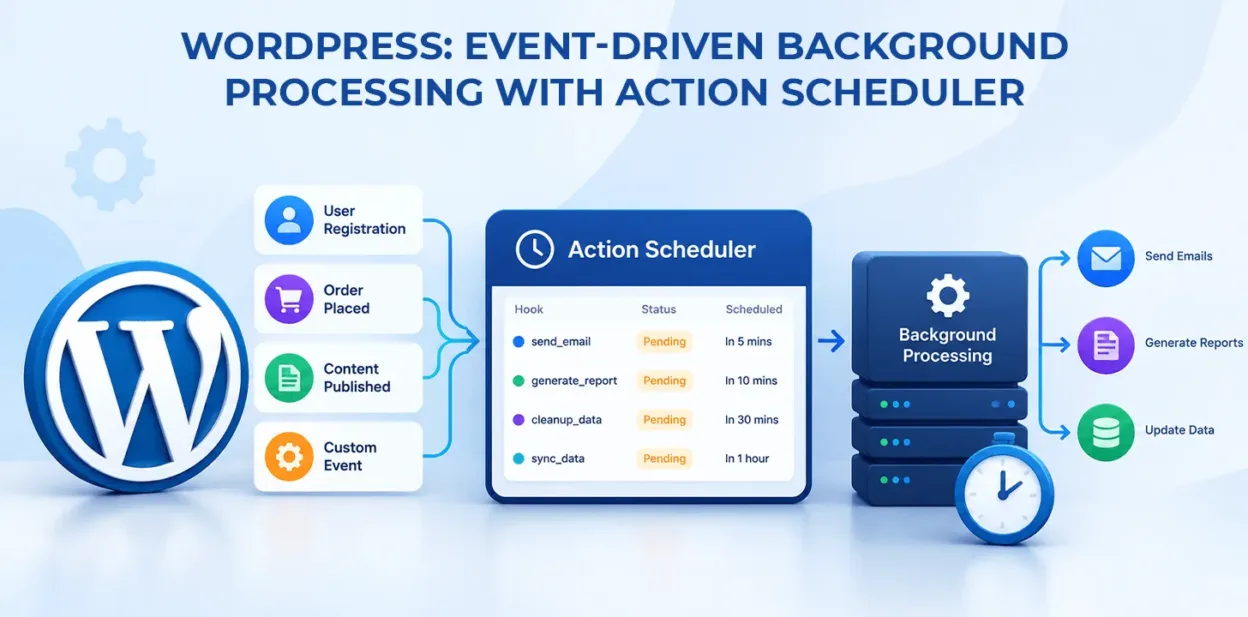
Long operations in WordPress – catalog syncs, batched emails, PDF invoices, third-party API calls – run inside a standard web request and cause timeouts, memory exhaustion, and a sluggish experience. WP-Cron handles basic scheduling, but it misses runs on low-traffic sites, has no concurrency control, and offers no built-in logging or failure recovery.
Action Scheduler is the background processing engine built into WooCommerce, also available as a standalone library for any plugin. It runs jobs asynchronously, stores queue state in database tables, handles automatic retries on failure, and provides an admin GUI to monitor, debug, and trigger jobs.
This first part of a two-part series queues a background job on an event and handles it safely in a worker. Part 2, Heavy Lifting: Batch Chunking & Recurring Tasks in Action Scheduler, covers large datasets and scheduled maintenance.

What This Example Does:
This example builds a complete background processing workflow:
- Checks that Action Scheduler is available and enqueues a background action when an event occurs (e.g., an order is placed).
- Hooks the action to a handler that runs heavy API calls or syncs without delaying the user’s response.
Code
Step 1: Verify Action Scheduler & Enqueue an Asynchronous Job
This step queues a single background action with arguments. If Action Scheduler is active (via WooCommerce or Composer), the job goes into the database queue and the HTTP request is released immediately.
PHP
<?php

/**

 * Step 1: Enqueue an Asynchronous Action

 *

 * Dispatches an asynchronous action when an event triggers.

 */

if ( ! defined( 'ABSPATH' ) ) {

    exit;

}

function mgcmp_schedule_async_order_sync( int $mgcmp_order_id, string $mgcmp_sync_channel ) {

    // 1. Guard against missing Action Scheduler library

    if ( ! function_exists( 'as_enqueue_async_action' ) ) {

        // Fallback to standard WP-Cron if Action Scheduler is unavailable

        if ( ! wp_next_scheduled( 'mgcmp_fallback_cron_sync', [ $mgcmp_order_id ] ) ) {

            wp_schedule_single_event( time() + 60, 'mgcmp_fallback_cron_sync', [ $mgcmp_order_id ] );

        }

        return;

    }

    // 2. Prevent duplicate queued actions for the same entity

    if ( as_has_scheduled_action( 'mgcmp_process_order_sync', [ 'order_id' => $mgcmp_order_id ], 'mgcmp-order-tasks' ) ) {

        return;

    }

    // 3. Enqueue the task to run asynchronously as soon as possible

    as_enqueue_async_action(

        'mgcmp_process_order_sync',

        [

            'order_id'     => $mgcmp_order_id,

            'sync_channel' => $mgcmp_sync_channel,

        ],

        'mgcmp-order-tasks'

    );

}

// Hook into order completion

add_action( 'woocommerce_thankyou', function( $mgcmp_order_id ) {

    if ( $mgcmp_order_id ) {

        mgcmp_schedule_async_order_sync( (int) $mgcmp_order_id, 'external_crm' );

    }

}, 10, 1 );
What this code does:
- Checks function_exists( ‘as_enqueue_async_action’ ) to avoid fatal errors if Action Scheduler isn’t loaded.
- Uses as_has_scheduled_action() to stop duplicate jobs piling up.
- Uses as_enqueue_async_action() to queue the task under the group mgcmp-order-tasks, passing order_id and sync_channel to the callback.
Step 2: Register the Worker Callback and Error-Safe Handling
This step registers the hook from Step 1. The queue worker reads the stored parameters, does the heavy processing, and throws exceptions on transient failures so Action Scheduler can log and automatically retry.
PHP
<?php

/**

 * Step 2: Handle the Asynchronous Action

 *

 * Processes the queued background task with logging and retry triggers.

 */

if ( ! defined( 'ABSPATH' ) ) {

    exit;

}

add_action( 'mgcmp_process_order_sync', 'mgcmp_handle_order_sync_worker', 10, 2 );

function mgcmp_handle_order_sync_worker( int $mgcmp_order_id, string $mgcmp_sync_channel ) {

    // 1. Validate incoming data

    if ( empty( $mgcmp_order_id ) ) {

        return;

    }

    $mgcmp_order = wc_get_order( $mgcmp_order_id );

    if ( ! $mgcmp_order ) {

        return; // Non-existent order; exit cleanly to prevent useless retries

    }

    // 2. Prepare payload for remote integration / expensive processing

    $mgcmp_payload = [

        'order_number' => $mgcmp_order->get_order_number(),

        'total'        => $mgcmp_order->get_total(),

        'customer'     => $mgcmp_order->get_billing_email(),

        'items_count'  => count( $mgcmp_order->get_items() ),

    ];

    // 3. Perform the heavy operation

    // Note: Replace 'https://api.example.com/sync-orders' with your actual production or staging API endpoint.

    $mgcmp_response = wp_remote_post( 'https://api.example.com/sync-orders', [

        'timeout'     => 45,

        'headers'     => [

            'Content-Type'  => 'application/json',

            'Authorization' => 'Bearer ' . sanitize_text_field( get_option( 'mgcmp_api_key' ) ),

        ],

        'body'        => wp_json_encode( $mgcmp_payload ),

    ] );

    // 4. Handle HTTP or network errors

    if ( is_wp_error( $mgcmp_response ) ) {

        throw new \RuntimeException( 'External API request failed: ' . $mgcmp_response->get_error_message() );

    }

    $mgcmp_status_code = wp_remote_retrieve_response_code( $mgcmp_response );

    if ( $mgcmp_status_code < 200 || $mgcmp_status_code >= 300 ) {

        throw new \RuntimeException( 'API rejected payload with HTTP status code: ' . $mgcmp_status_code );

    }

    // 5. Store audit trace directly on the entity

    $mgcmp_order->update_meta_data( '_mgcmp_synced_at', current_time( 'mysql' ) );

    $mgcmp_order->save();

}
What this code does:
- Hooks into mgcmp_process_order_sync with 2 arguments.
- Makes a network request with a long timeout that would otherwise block a visitor’s browser.
- Throws \RuntimeException on API or network failure. Action Scheduler catches it, marks the attempt failed with a stack trace in the admin logs, and retries per configured policy.
Real-Life Use Cases
- Third-Party API Integrations & Webhooks: Offload slow or rate-limited API syncs (e.g., orders to ERP platforms like SAP/NetSuite, or inventory from warehouse endpoints) so checkout pages load instantly.
- Bulk Customer Notifications & Marketing Campaigns: Send email or SMS alerts in queued batches to avoid SMTP quotas and mail server timeouts.
- Heavy Media & Document Generation: Generate downloadable PDF invoices, receipts, or batch watermark conversions right after order completion.
Conclusion
Action Scheduler provides WordPress developers with a practical foundation for moving slow operations out of customer-facing requests. By combining event-driven scheduling, background workers, error handling, and execution logs, developers can build more responsive and maintainable WooCommerce integrations.
The example in this guide demonstrates how to queue an order synchronization job, process it in a worker, send data to an external API, and record the successful result.
FAQ
1. What is Action Scheduler in WordPress?
Action Scheduler is a background processing library used by WooCommerce and other WordPress plugins to schedule, queue, and execute tasks asynchronously. It provides a database-backed queue, execution logs, and an administrative interface for monitoring scheduled actions.
2. When should you use Action Scheduler?
Use Action Scheduler for tasks that are too slow or resource-intensive to run during a regular web request, such as order synchronization, bulk email delivery, product catalog imports, PDF generation, and third-party API integrations.
3. Can Action Scheduler process large datasets?
Yes. Action Scheduler can coordinate large processing workflows, but developers should divide extensive workloads into smaller batches. Batch processing helps control memory usage, reduce execution time, and make failed operations easier to resume.