

Shopify RFQ Request Quote & Hide Price
Shopify request quote & hide price app for Shopify allows merchants to hide product prices and hide the add to cart button on their Shopify store. Instead of displaying the price, a button is shown, indicating that customers need to request a quote for the pricing information.
- Conceal pricing information of all or specific products or entire collections.
- Add a “Call for Price” button on product pages.
- Admin receives quote requests through email or phone calls.
- Offer competitive rates and convert quotes into orders.
- Personalize the layout of button.
Extension Screenshots
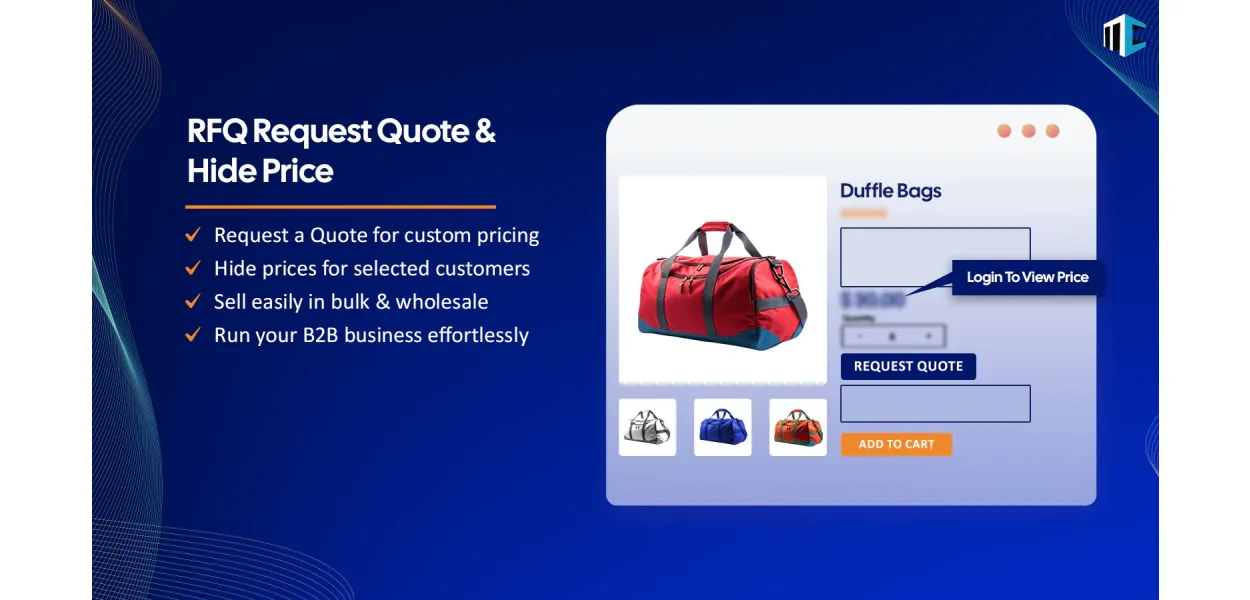
Hide Product Prices & Turn Inquiries Into Orders
Take control of your Shopify pricing strategy with RFQ Request Quote & Hide Price. Hide prices for selected products or collections, invite customers to request custom quotations, and create a more flexible buying experience for B2B and wholesale sales.
- Flexible price visibility
- Custom quote requests
- B2B-friendly selling
Encourage buyers to contact your team for product pricing.
Make Room for Custom Pricing
Not every product needs a fixed public price. Give customers a direct way to discuss pricing while keeping your product catalog organized and accessible.
Control Price Visibility
Hide pricing for individual products or selected collections when prices depend on customer requirements, order size, or business terms.
Encourage More Inquiries
Replace publicly visible pricing with a clear call-to-action that invites potential buyers to contact your business.
Support B2B Selling
Create a more suitable buying experience for wholesalers, retailers, distributors, and customers with negotiated pricing needs.
Receive Quote Requests
Let shoppers inquire about product pricing through supported contact methods, including email or phone.
Customize Your CTA
Adjust the call-for-price button's appearance to better complement your Shopify store's visual identity.
Move Toward an Order
Review quote requests, respond with suitable pricing, and convert accepted quotes into orders using the app's supported workflow.
Hide Prices for Selected Products
Keep pricing information private when you need to evaluate a customer's requirements before sharing a quote. RFQ Request Quote & Hide Price helps you introduce a quotation-based purchasing experience without changing your entire business model.
Receive quote inquiries through the app's supported contact workflow.
Make Quote Requests Simple and Direct
Give customers a clear path to request product pricing. The app supports a custom RFQ form, allowing you to gather the information needed to understand inquiries and prepare suitable quotations.
Match the Quote Button to Your Store Theme
Your quotation call-to-action should feel like a natural part of your storefront. Customize the supported button styling to maintain a consistent experience from product discovery to pricing inquiry.
Contact our team for a quotation tailored to your business requirements.
From Hidden Prices to Confirmed Orders
Create a quotation-focused buying journey that helps shoppers express their interest and gives your team a way to respond with relevant pricing.
Choose Products
Identify the products or collections that need a quote-based pricing experience.
Enable the RFQ Option
Configure supported price visibility and quote button settings for your store.
Review Inquiries
Receive and manage customer quote requests, then prepare suitable pricing responses.
Convert Accepted Quotes
Move forward with customers who accept your quotation by converting accepted quotes into orders.
Who Can Benefit from RFQ?
RFQ Request Quote & Hide Price is useful for businesses that need to discuss requirements or negotiate prices before confirming a purchase.
Wholesale Businesses
Invite retailers and bulk buyers to request pricing for larger orders and wholesale product ranges.
B2B Suppliers
Provide business customers with a direct route to discuss product availability, requirements, and pricing.
Manufacturers
Handle inquiries for products that may require specific quantities, configurations, or business terms.
Custom Product Sellers
Encourage customers to share their needs before receiving a price for customized products.
High-Value Products
Offer a quote-based approach for products where pricing discussions are part of the sales process.
Negotiated Pricing Stores
Keep pricing flexible when quotations vary by customer, order size, or negotiated terms.
Explore More MageComp Apps
Complement your quotation workflow with tools that help manage wholesale reordering and quantity-based pricing.
OROSHI Wholesale Reorder
Make repeat purchasing easier for wholesale customers. Pair quote-based pricing with a smoother reorder experience for returning business buyers.
Explore OROSHI ↗QUO Volume Discount Tier Price
Encourage larger purchases with tiered volume discounts. Use QUO for products with defined quantity-based pricing while RFQ supports products that need custom quotations.
Explore QUO ↗Everything You Need to Know About RFQ
Learn how a request-for-quote workflow can support your Shopify store's pricing strategy.
1. What is RFQ Request Quote & Hide Price for Shopify?
RFQ Request Quote & Hide Price is a MageComp Shopify app that lets merchants hide product prices and invite customers to request quotations. It supports custom quote requests, price visibility controls, and workflows for managing and converting accepted quotes into orders.
2. Can I hide prices for specific products only?
Yes. The app supports price concealment for individual products as well as selected product collections, helping you choose where quote-based pricing is appropriate.
3. Can I hide prices for an entire collection?
Yes. You can configure selected collections for a quote-based purchasing experience, which can be useful for wholesale catalogs and business-only product ranges.
4. How can customers request product pricing?
Customers can use the displayed quote or call-for-price option and submit a quote inquiry using the app's supported workflow. Merchants can receive inquiries through supported email or phone contact methods.
5. Can I customize the Request a Quote button?
Yes. The app provides options to customize the button's appearance, including text and background colors, to better suit your Shopify theme.
6. Can I manage quote requests and convert them into orders?
Yes. The app provides functionality to manage incoming quote requests and convert accepted quotes into orders, helping you move from price inquiries to purchasing.
7. Is this app suitable for wholesale and B2B Shopify stores?
Yes. It can be useful for wholesalers, suppliers, manufacturers, and other businesses that negotiate pricing according to order size, customer requirements, or commercial terms.
8. Can I use RFQ alongside volume discount apps?
Yes. They can serve different pricing needs. An RFQ workflow helps manage products requiring custom quotations, while a volume discount app can offer defined price tiers based on quantity. Configure each app according to your store's requirements.
Ready to Make Your Shopify Pricing More Flexible?
Hide prices where needed, give customers a clear way to request quotations, and build a buying experience that works for your B2B and wholesale business.
Get RFQ Request Quote & Hide Price ↗ Learn More About RFQMerchants might choose to hide catalog prices on their online stores. Businesses that offer highly customizable or personalized products may prefer not to display prices upfront. When prices are negotiable at that time, the need for hiding product prices arises. Businesses that primarily deal with wholesale or business-to-business (B2B) transactions may choose to hide prices from the general public. Businesses offering exclusive promotions or membership-based pricing may hide regular prices. And many more reasons may emerge for price concealment.
RFQ Request Quote & Hide Price app by MageComp helps hide product prices and display a Call for Price button. The app uses the Request for Quote (RFQ) model, where customers are encouraged to submit their requirements, and the business provides customized price quotes based on those requirements. This initiates a communication process between the customer and the store owner. Tailor the appearance of the "Call for Price" button to seamlessly integrate with your store's theme.
: Request Quote & Hide Price for Shopify Features Highlights :
Price Concealment for Products
Request Quote & Hide Price Shopify plug-in allows store owners to make the pricing information invisible on product pages. Instead, add a “Call for Price” to allow customers to request a quote.
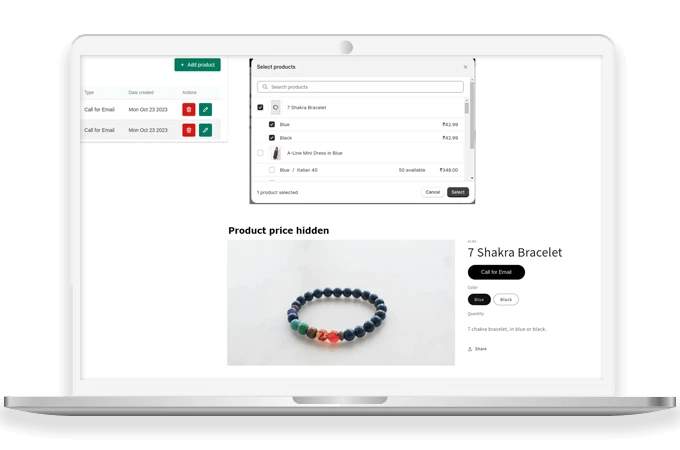
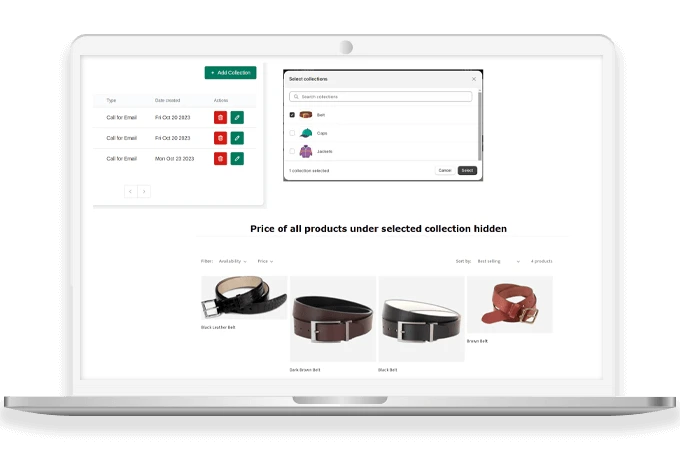
Hide Prices for Whole Collections
RFQ Request Quote & Hide Price addon also has the option to conceal prices for the complete collection. Prices of all the products under the collection won’t be displayed when selected for the call for price option.
Customize the Appearance of Call for Price button
Based on the store’s theme, merchants can configure the appearance of the CTA button from the backend. Change the color of text & background as per the requirement for Call for Price button.

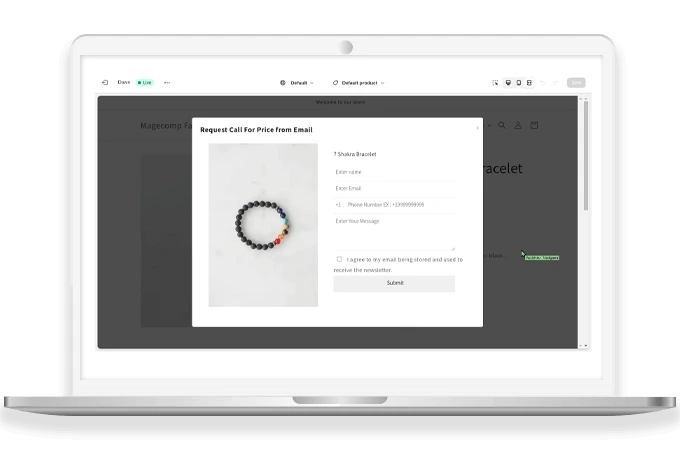
Customers Can Request Quote Via Email or Call
Customers can directly request a quote from the product page just by entering the required details. The store owner receives the requests and quickly responds to customers.
Why Choose Request Quote & Hide Price App by MageComp?
- Offer more flexibility to merchants in managing product pricing details.
- Hide pricing information of all or particular products or entire collections.
- Permit users to inquire about product prices via email or phone call.
- Create a unique and visually appealing call-to-action button.
- Provide flexibility in pricing to maximize conversions and boost your overall sales.