
Purchase Quantity Control
Explore quantity restrictions to help define how much customers can purchase according to your store's rules.
01
Inventory management made easy with the LIMITER Order Limits Shopify app. Manage your inventory easily by applying limits with custom rules and conditions. Easily set limits with predefined templates for the minimum and maximum limits for products, collections, cart items, and order value.
Set purchase quantity limits for your Shopify store and create a more controlled buying experience. LIMITER Order Limits helps you manage product quantities according to your store's requirements.
Managing how much customers can purchase can be important for product availability, promotions, and order planning. LIMITER Order Limits provides a dedicated Shopify app to explore purchase quantity restrictions that suit your store's selling strategy.
Explore the ways order quantity controls can help you organize purchasing rules and manage your Shopify store.
Explore quantity restrictions to help define how much customers can purchase according to your store's rules.
01Align your purchasing approach with product availability, promotional campaigns, and individual product requirements.
02Set clear expectations around purchase quantities to support a more consistent shopping experience.
03Use order quantity restrictions as part of your broader merchandising and order management approach.
04Build a purchasing process that better aligns with the needs of your products, customers, and business operations.
05Consider quantity restrictions when planning limited-stock releases, special offers, and other selling campaigns.
06A clear approach to order quantities can help you manage customer purchases more consistently. Explore LIMITER Order Limits as part of your Shopify store's order management toolkit.
Plan quantity controls around your store's selling needs.
Help customers understand your store's purchase requirements.
Consider quantity limits when planning special offers or product releases.
Start with the app listing, review the available capabilities, and configure the options supported by the app for your store.
Visit LIMITER Order Limits on the Shopify App Store and review its current features and requirements.
Follow the app's available setup instructions and choose settings that match your store's quantity requirements.
Test your configuration and confirm that the purchase experience matches your intended store policies.
Find general answers about order quantity controls and choosing related Shopify apps.
View App DetailsExplore LIMITER Order Limits and discover how order quantity management could fit into your Shopify store workflow.
Explore LIMITER Order Limits A Shopify solution by MageCompProblem
eCommerce store owners are often stuck in the dilemma of managing their store inventory properly. Without proper control, best sellers are often over-ordered by individual customers or resellers, leading to sudden stock shortages and customer dissatisfaction.
Bulk purchasing during sales or product launches can create an unfair buying experience and cause inventory to deplete faster than expected. Additionally, most platforms don’t offer built-in functionality to enforce minimum or maximum purchase quantities, especially when it comes to segmenting customer types like retail vs. wholesale buyers.
Manually setting up these restrictions, or relying on developers to do so, can be time-consuming, error-prone, and difficult to scale. As a result, merchants struggle to maintain fair access to products, protect their stock, and align purchases with their operational capacity.
Solution
LIMITER Order Limits solves these challenges by offering a smart and flexible way to manage quantity restrictions. The app enables store owners to define rules that match their exact business needs, be it limiting a product to prevent stock hoarding or enforcing a minimum quantity for B2B buyers.
With an intuitive interface, ready-made templates, and robust rule-setting logic, LIMITER allows precise control over how much of a product a customer can buy, who can buy it, and under what conditions. It brings peace of mind to merchants while ensuring customers have a fair, consistent shopping experience.
Advantages of LIMITER Order Limits
Automated purchase restrictions reduce manual monitoring and eliminate the need to check orders for abuse or bulk buying.
Set rules based on product, collection, customer type, cart value, or order volume, without needing extra customisation or coding.
Prevent out-of-stock situations caused by unexpected high-volume purchases, helping you forecast and restock accurately.
Ensure that all shoppers have a fair chance to buy your best-selling products by limiting bulk orders from individual customers or resellers.
Perfect for flash sales, limited-time offers, or exclusive launches where you want to limit how much each customer can buy to increase reach and customer satisfaction.
With growing mobile traffic, HOOK ensures the login process is just as smooth on smartphones and tablets as it is on desktops.
Feature Highlights of LIMITER Order Limits
Product-Level Limit Settings
Assign unique minimum and maximum purchase limits to individual products. Ideal for managing exclusive or high-value items with limited availability.


Collection-Based Limit Controls
Apply consistent rules to entire collections in just a few clicks—no need to set rules individually for every product.
Cart Quantity & Order Value Restrictions
Set rules based on the total number of items or total value in the cart. Perfect for encouraging bulk purchases or capping large orders to avoid abuse.

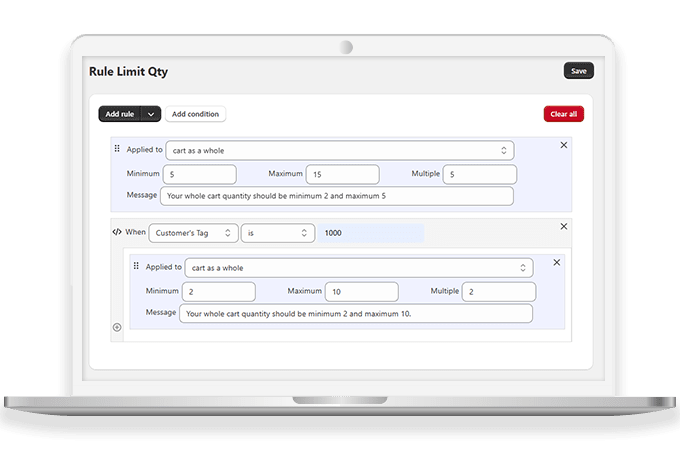
Customer Group-Based Rules
Segment your customers (e.g., retail vs. wholesale) and apply different purchase rules accordingly. This ensures tailored buying experiences for each group.
Real-Time Rule Preview
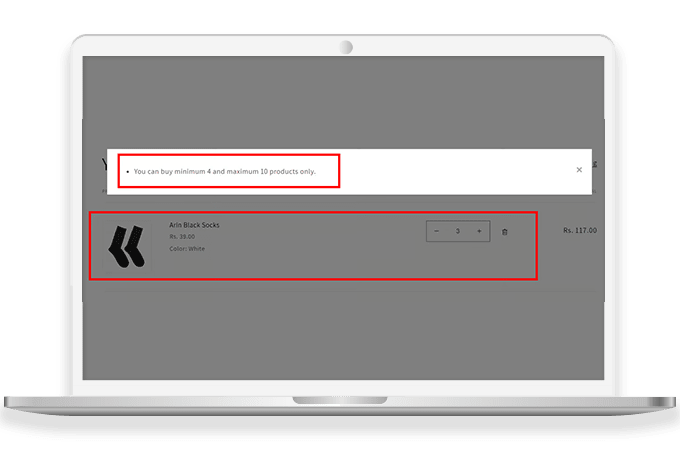
Test your limit logic with instant previews before applying changes live, reducing the risk of misconfigured rules that could impact sales.
Why Choose LIMITER Order Limits Shopify App by MageComp?
| Product Count | 20 |
|---|