

CODFY Cash On Delivery
CODFY Cash on Delivery is a Shopify app that gives admins full control of their COD payments. Admins can easily define eligibility using order value, postal codes, phone numbers, and email addresses. With built-in shipping rate configuration and bulk zip code uploads, CODFY ensures a flexible, secure, and smooth checkout experience tailored to your business needs.
- Set minimum and maximum order amounts to ensure COD is only offered to eligible transactions.
- Upload zip/postal codes via CSV to allow or restrict COD in specific areas or regions.
- Create COD rules using customer details like phone number, email ID, or country for tighter control.
- Set and display custom shipping charges for COD orders, directly from the backend to the storefront.
- Easily manage hundreds of postal codes using a CSV file for fast COD setup.
- Display available COD options and charges dynamically based on the customer's location and cart value.
- Reduce fake COD orders by filtering based on suspicious email or phone patterns.
- Works smoothly with your Shopify store, no coding needed. Quick to install and easy to configure.
Extension Screenshots
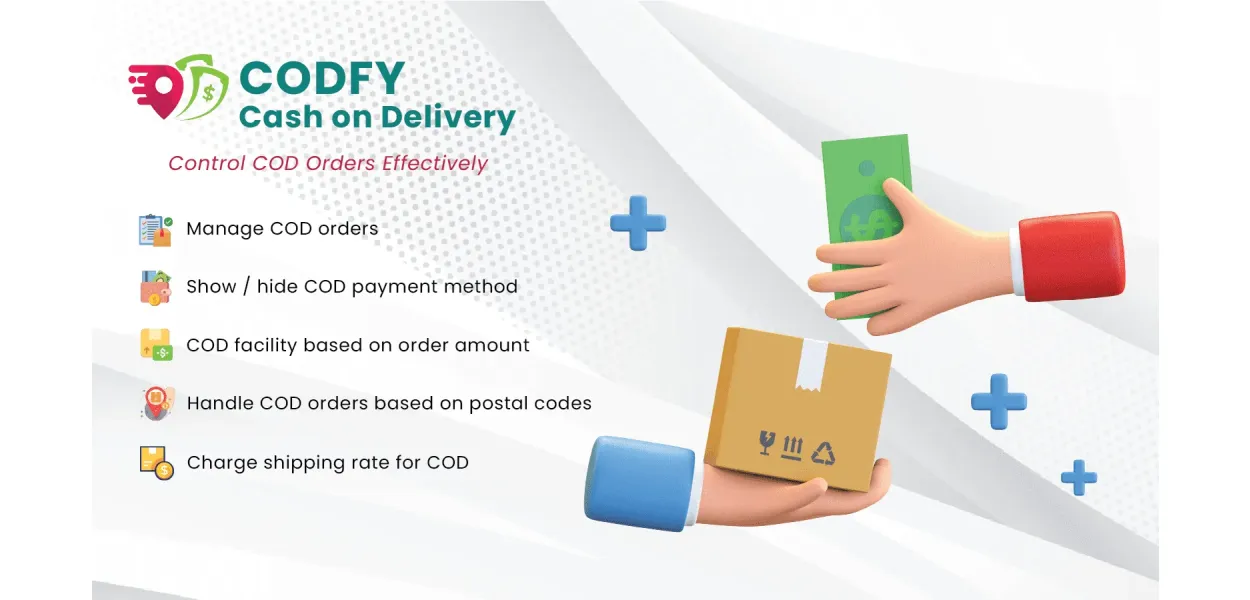
Take Complete Control of Cash on Delivery
Give customers the COD option when it makes sense for your business. Set rules by order value, location, phone number, email and more — all without touching code.
COD Should Be a Business Rule, Not a Guess
Offering COD to every customer can expose your store to delivery restrictions, high-value order risks, fake orders and unnecessary operational costs.
COD
CONTROL
orders
locations
orders
costs
Show COD only when the order qualifies.
CODFY gives Shopify merchants the flexibility to decide exactly when Cash on Delivery should appear at checkout.
Instead of applying one COD rule to every customer, create conditions that match your delivery network, order values and customer policies.
- Limit COD using minimum and maximum order values.
- Control availability by postal or ZIP code.
- Apply conditions using phone numbers and email addresses.
- Allow or restrict COD for selected countries.
- Configure additional shipping charges for COD.
Everything You Need to Control COD
Build practical COD rules around the way your store actually accepts, ships and fulfils orders.
Order Value Rules
Set minimum and maximum order values to decide which transactions qualify for COD.
Postal Code Control
Allow or restrict COD for specific ZIP or postal codes based on delivery coverage.
Bulk CSV Upload
Manage large lists of postal codes quickly using a convenient CSV upload.
Email-Based Rules
Control COD availability using customer email addresses for more targeted eligibility.
Phone Number Rules
Create COD conditions around customer phone numbers to improve order quality.
Country-Based Control
Show or hide COD based on the customer's country and your delivery strategy.
COD Shipping Charges
Add custom charges for COD orders and make applicable costs clear to customers.
Dynamic Availability
COD availability can adapt according to cart value and customer location.
Simple Setup
Configure your COD rules without development work or complicated technical settings.
From Rule Setup to Checkout Control
CODFY keeps the entire process straightforward, so merchants can configure COD without relying on developers.
Define Rules
Choose the conditions that should determine COD eligibility.
Set Locations
Manage countries and postal codes where COD should be available.
Configure Charges
Add applicable shipping charges for customers choosing COD.
Let CODFY Work
Eligible customers see the appropriate COD option at checkout.
Turn COD Into a Smarter Checkout Option
Give customers the convenience they expect while keeping merchants in control of where and when COD is offered.
Improve Order Quality
Restrict COD using meaningful eligibility conditions to reduce unwanted orders.
Reduce Delivery Risks
Limit COD to serviceable areas and customer conditions that suit your logistics.
Increase Transparency
Clearly configure COD-related charges so customers understand the applicable cost.
Save Manual Effort
Automate COD eligibility instead of checking customer and location conditions manually.
Protect High-Value Orders
Set order value limits so COD isn't automatically available for every transaction.
Better Customer Experience
Customers see the COD option when their order meets your store's defined requirements.
Build COD Rules Around Your Store
Combine different conditions to create a COD strategy that fits your products, customers and delivery network.
Your checkout. Your rules.
Whether you want to restrict COD to certain order values, selected locations or specific customer details, CODFY provides the controls you need from one simple interface.
Everything You Need to Know About CODFY
Find quick answers about setting up, controlling, and managing Cash on Delivery for your Shopify store.
CODFY is a Shopify app that helps merchants control when Cash on Delivery is available to customers. You can create rules based on order value, location, postal code, phone number, email address, and other conditions.
Yes. CODFY lets you define minimum and maximum order values so Cash on Delivery is available only when the cart value falls within your chosen range.
Yes. You can control COD availability based on postal or ZIP codes. CODFY also supports bulk postal-code management through CSV upload, making it easier to manage large location lists.
Yes. Instead of entering postal codes individually, you can use CSV-based bulk management to handle larger lists more efficiently.
Yes. CODFY provides country-based controls that allow merchants to decide where Cash on Delivery should be available according to their delivery strategy.
Yes. CODFY supports customer-based conditions using details such as phone numbers and email addresses, giving you more control over COD eligibility.
Yes. You can configure an additional shipping or COD charge so applicable costs can be passed on to customers choosing Cash on Delivery.
No. CODFY is designed to make COD management simple for Shopify merchants without requiring them to modify their store code.
CODFY is useful for Shopify stores that offer Cash on Delivery and want greater control over order values, delivery locations, customer eligibility, and COD charges.
Make COD Work Better for Your Shopify Store
Set smarter eligibility rules, control delivery locations and give customers a smoother Cash on Delivery experience.
Get CODFY Free →Problem
A significant portion of the customer segment favours cash on delivery as the payment option over other payment options, but should they not find that option, customer disappointment is possible, and there is the likelihood that they will abandon their cart.
If store owners cannot get dynamic control over where and when COD is offered, then they face situations such as fake orders, non-deliverable areas, or excessive return rates. Customers get disappointed when they cannot use COD at their location or order value, and you lose their trust and conversions.
Solution
CODFY Cash on Delivery Shopify app by MageComp is an app that solves these challenges by giving merchants the flexibility to define when and where the cash on delivery option is available. You can easily set COD eligibility rules based on order value, zip code, phone number, email ID, and even country. Whether you want to exclude high-risk postal codes or allow COD options for specific cart sizes only, CODFY makes everything seamless.
Shipping charges can also be customised and shown upfront, improving transparency. By enabling the cash-on-delivery option for those areas where it is beneficial for business, it helps store owners experience lower order returns and fraudulent cases.
Besides store owners, even shoppers benefit too, as they know instantly if the COD option is available for them or not, leading to a faster decision-making process and improved satisfaction. With CODFY, you get full control without sacrificing customer convenience.
Advantages of CODFY Cash On Delivery
- Improved Order Quality
By restricting COD to eligible customers and locations, CODFY reduces the chances of fake, incomplete, or fraudulent orders. This helps merchants maintain a cleaner order pipeline and ensures that logistics efforts are spent only on high-quality, reliable orders.
- Higher Customer Satisfaction
CODFY ensures customers instantly know whether the COD option is available to them based on their location and order value. This reduces confusion, enhances trust, and encourages more customers to complete their purchases without frustration or abandoned carts.
- Greater Operational Control
Merchants can manage COD availability using multiple criteria like order amount, customer location, phone number, and email. This flexibility helps store owners customise their payment options to match business policies and logistics capabilities.
- Region-Specific Flexibility
CODFY supports CSV uploads of zip/postal codes, making it easy to include or exclude delivery areas in bulk. Store owners can ensure COD is only offered where it's safe and feasible, especially in remote or high-risk zones.
- Better Checkout Transparency
Customers can see any additional shipping charges associated with COD during checkout. This eliminates surprises, helps manage expectations, and reduces the chances of post-purchase disputes or cart abandonment.
Feature Highlights of CODFY Cash On Delivery
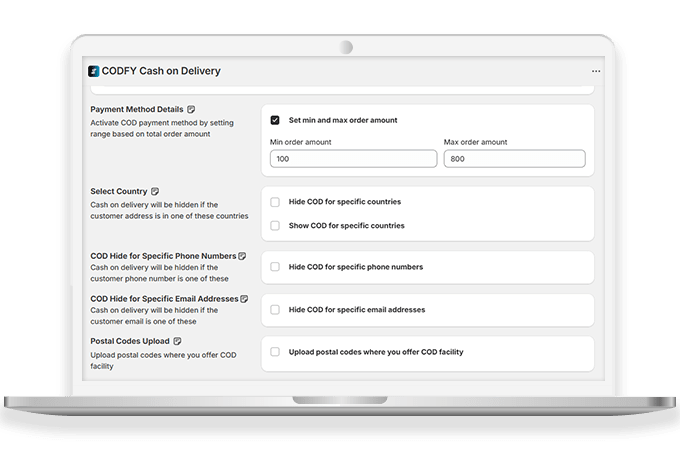
Set COD Based on Total Order Amount
Enable or disable COD based on minimum or maximum order value, helping you avoid losses on low-value orders or risks on high-ticket purchases.
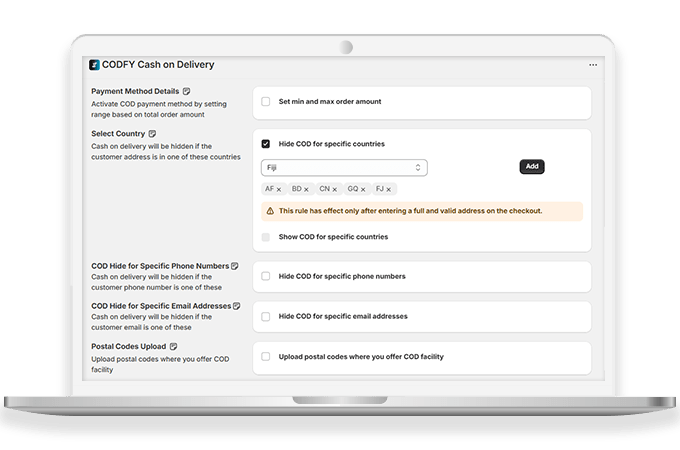
Hide COD Option Based on Countries
Restrict COD for specific countries where logistics are reliable, reducing shipping issues and improving regional control over order fulfillment.
Show COD Option Based on Countries
Allow COD for specific countries where logistics are reliable, reducing shipping issues and improving regional control over order fulfillment.


COD Option for Specific Phone Numbers
Whitelist or blacklist certain mobile numbers for COD eligibility to reward trusted customers or prevent repeat fraudulent purchases.
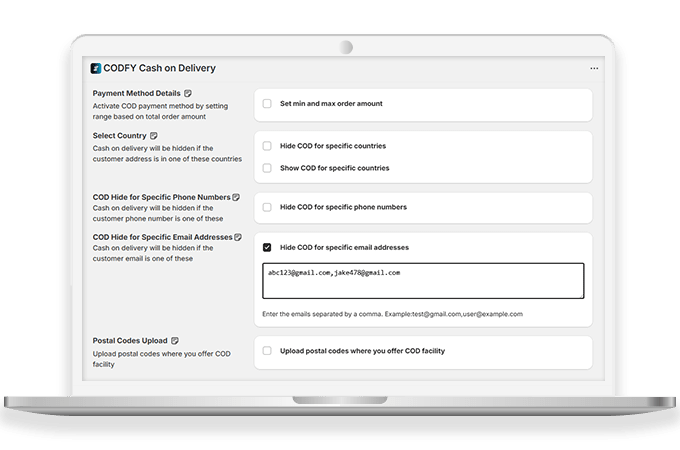
COD Option for Specific Email Addresses
Manage COD availability based on customer email addresses, great for allowing VIP buyers or blocking problematic users from using COD.
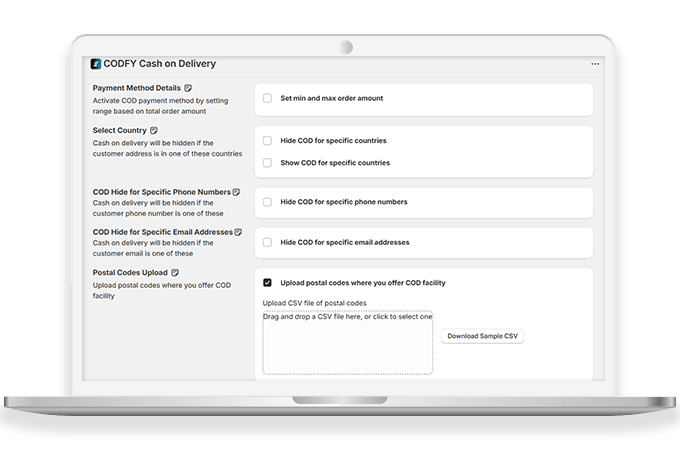
COD Option Based on Postal Codes
Allow COD only in serviceable or low-risk PIN codes to streamline logistics, reduce delivery failures, and improve operational efficiency.
| Product Count | 20 |
|---|