
Minimum & Maximum Quantity
Set minimum and maximum purchase quantities for selected products and variants. Help customers buy within the range defined for your store.

MageComp’s KOR Order Limit Quantity is a Shopify app that allows merchants to set minimum and maximum limits on their store products, collections, and customer tags, limiting bulk ordering and making store products available for every customer.
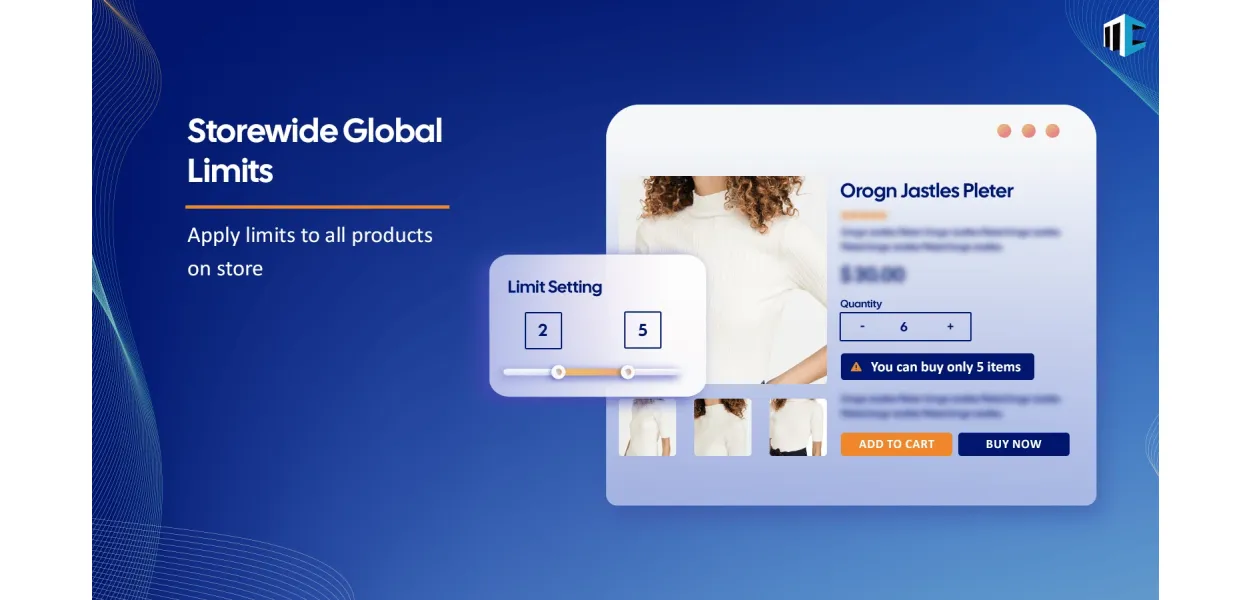
Take control of product quantities, minimum order requirements, and checkout rules with KOR Order Limits Quantity. Create flexible purchasing rules for products, variants, collections, customer tags, and carts to support wholesale sales and everyday store operations.
Unrestricted purchasing can create challenges for stores handling limited inventory, wholesale orders, special promotions, or products with specific buying requirements. KOR helps you define the conditions customers must meet before placing an order.
Explore KOR on Shopify →Build purchasing rules around your inventory, customer requirements, and order policies with flexible limit options.
Set minimum and maximum purchase quantities for selected products and variants. Help customers buy within the range defined for your store.
Apply individual quantity conditions to specific products or variants, giving you more control over items with different selling requirements.
Configure purchase limits for products within selected collections and manage related items using collection-level rules.
Use customer tags to apply suitable product quantity or order value limits for different customer groups, including B2B buyers.
Define boundaries for cart quantities and order values to help maintain minimum purchase requirements or limit large orders.
Configure minimum or maximum order weight requirements to support shipping, packaging, and order-handling policies.
Set quantity multiples for products sold in packs or fixed increments. For example, require customers to purchase in multiples of three.
Configure lifetime or time-interval purchase restrictions for supported scenarios. Customer login requirements may apply to these rules.
Configure checkout validations, set rule priorities, and customize limit messages to explain purchase requirements to customers.
Establish storewide limits and configure more specific rules for products or collections according to your selling requirements.
Import product limits through CSV on supported plans to make rule management more convenient for larger product catalogs.
Display a low-stock counter to help communicate inventory availability and support purchase decisions on eligible products.
Create purchasing conditions that align with your store's products, customers, and order policies.
Select the type of restriction you need, such as product quantity, cart amount, collection, or customer-based limits.
Define the applicable quantities, thresholds, customers, products, or other available rule conditions.
Set applicable checkout validations and customer-facing messages to communicate your purchasing requirements.
Use your configured rules to guide purchases and keep orders aligned with your store policies.
Use purchasing rules to accommodate different products, customer groups, and business models.
Define minimum quantities, bulk purchasing conditions, and customer-tag-based rules for wholesale buyers.
Set quantity ceilings for selected items to help manage access to products with restricted availability.
Use supported lifetime or time-interval purchase restrictions for products with repeat-purchase requirements.
Apply global rules, product-specific conditions, and bulk CSV management where supported.
Learn how KOR can help you configure purchasing rules for your Shopify store.
KOR Order Limits Quantity is a Shopify app by MageComp that helps merchants control product quantities, minimum order requirements, cart limits, and other purchasing conditions. It supports rules for products, variants, collections, customer tags, and additional order criteria.
Yes. You can configure minimum and maximum purchase quantities for supported products and variants. These rules help establish how many units a customer must or may purchase.
KOR supports customer-tag-based restrictions for supported quantity and order-value conditions. You can use customer tags to help apply purchasing rules for different customer groups, including wholesale buyers.
Yes. KOR supports collection-level restrictions. Depending on the rule you configure, you can set limits for products within a collection or control the number of products customers may purchase from that collection.
Yes. KOR supports minimum and maximum conditions for order amount and order weight, as well as supported cart quantity rules. These settings can help enforce your store's minimum order and fulfillment requirements.
Yes. The quantity-multiple option allows you to define increments for supported products. For example, if the required multiple is three, customers can purchase quantities such as 3, 6, 9, or 12.
KOR supports future purchase limits based on a lifetime or configured time interval. Customer login requirements may apply for these restrictions to work as intended, so review the app's setup instructions before enabling them.
Yes. KOR supports customized messages for applicable limit conditions, helping customers understand why their purchase does not meet the configured requirements.
KOR supports importing product limits through CSV on eligible plans. This can help reduce manual work when setting up restrictions across a larger catalog.
KOR provides a broad set of purchase controls, including quantity, cart, order-value, weight, collection, and customer-tag-based rules. LIMITER Order Limits offers another set of order restriction options. VOX Limit Orders Per Day focuses on weekday-based order quantity thresholds. Review each app's current listing to identify the best fit for your specific requirements.
Set clear purchasing rules, support wholesale requirements, and manage product quantities with KOR Order Limits Quantity by MageComp.
Get KOR Order Limits Quantity →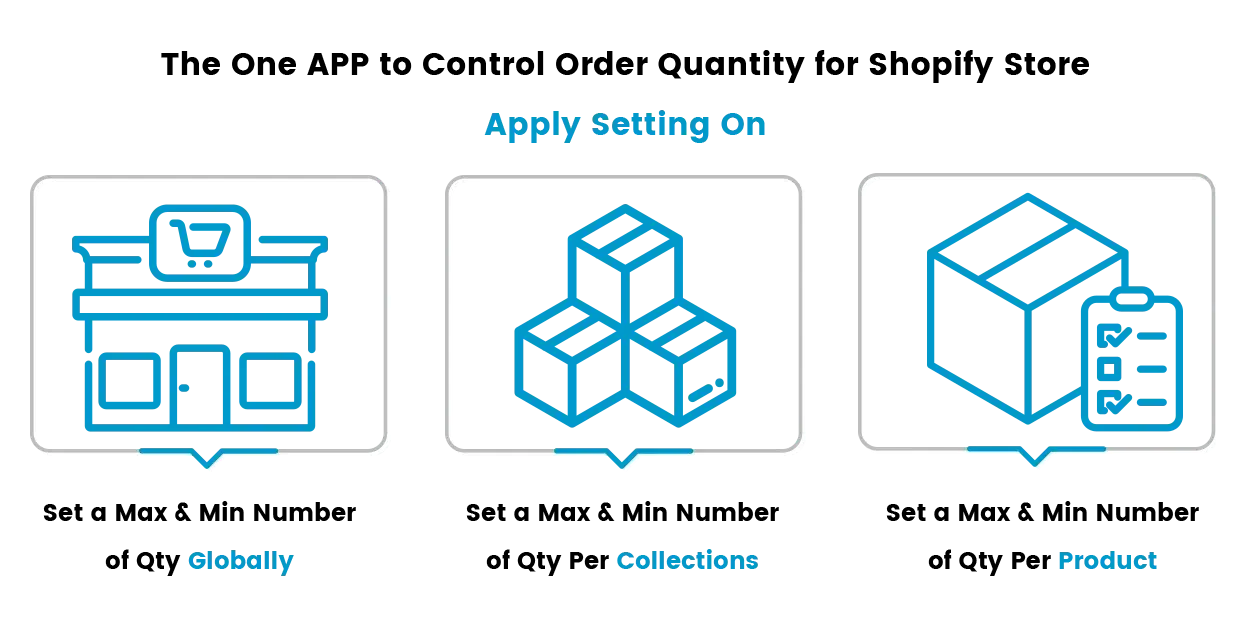
Basically, when any online store wants to set the limit for the purchasing quantity of the product for an individual customer. Else if there is a B2B store and the store owner wants to add a limit to purchase quantity of the product for any customer then the flow to sell products to all the customers in your store will be smooth and all the customers can purchase that product.
Limit Quantity Purchase by MageComp is capable of helping you to achieve the set purchase quantity limit for the products. The module helps you if you require to restrict the limit of purchase quantity for a specific product, product group, or globally. Either you require to set the maximum purchase limit for a specific product, product group or globally in your store. Set up the maximum or minimum quantity to be purchased for a specific product, collection, or globally in the whole store. Here B2B merchants are helpful as the customers can't purchase above and below the limit you set in your store.
Problem
Inventory management is one of the most challenging tasks for eCommerce store owners because of bulk buying, misusing promotions, and many other reasons.
Whether it is about launching a new product, managing a high-demand item, or promoting a sale season, merchants need to manage their customers' orders seamlessly, and setting flexible purchasing limits lets them do so:
Shopify’s built-in settings do not offer the level of customization merchants need to handle these situations effectively.
Solution
The KOR Order Limit Quantity app was developed to address these exact challenges. It provides a robust and flexible system for setting product quantity limits across your entire Shopify store.
Whether you want to limit purchases per customer, restrict high-demand items, or ensure fair access to limited stock, KOR gives you the tools to do it, without technical complexity. Set rules based on:
All of this is managed through a clean and intuitive interface, with real-time alerts that communicate restrictions directly to customers.
Advantages offered by KOR Order Limit Quantity
Applying limits on products ensures that the limited products or exclusive launches are distributed fairly among all the orders, avoiding quick sellouts caused by bulk buyers.
The applied restrictions prevent customers from over-ordering discounted items, protecting your profit margins.
Merchants can display clear, real-time messages that explain purchasing limits, reducing confusion and abandoned carts.
KOR allows you to use the bulk CSV upload feature to apply and update rules across thousands of products without manual efforts.
Applying different rules to retail and wholesale customers using Shopify customer tags, ensuring tailored purchase conditions.
Automate inventory protection across your store, freeing you from having to monitor individual products or orders.