
Image ALT Text Optimization
Create descriptive ALT text using customizable templates and dynamic variables. Improve image context and accessibility while supporting image SEO.
IMAGE SEO
Give your store's SEO a stronger foundation with SPIDER Website SEO Optimizer. Optimize image ALT text, improve image filenames, manage metadata, add structured data, check broken links, and support your store's search visibility from one place.
Search optimization involves more than adding keywords to product descriptions. Image attributes, page metadata, structured data, and working URLs all contribute to a more search-friendly store.
SPIDER brings essential SEO tasks together so Shopify merchants can work on these areas more efficiently and maintain a more consistent optimization process.
Use meaningful ALT text and descriptive filenames for product images.
Use metadata templates and structured data to support search engines' understanding of your pages.
Check for broken links and support URL indexing workflows.
Bring image optimization, page-level improvements, and technical checks into your store management routine.
Make image content easier for search engines to interpret.
Apply a repeatable approach to page titles and descriptions.
Identify URL issues that deserve further attention.
Manage essential SEO activities in a more structured workflow.
Work on the essential SEO elements of your Shopify store with tools designed to simplify common optimization tasks.
Create descriptive ALT text using customizable templates and dynamic variables. Improve image context and accessibility while supporting image SEO.
IMAGE SEOUse meaningful filename conventions instead of generic names to make image assets more descriptive and organized.
FILE NAMINGBuild reusable templates with available dynamic variables to create consistent ALT text, filenames, and metadata across relevant store content.
SMART TEMPLATESChoose to optimize all eligible images or target specific products, helping you manage large catalogs more efficiently.
BULK WORKFLOWConfigure templates for page titles and meta descriptions to maintain a more consistent on-page SEO approach across products.
ON-PAGE SEOWork with supported JSON-LD schema markup to help search engines interpret relevant information about your store and its pages.
STRUCTURED DATAScan for broken links and 404 pages so you can identify URLs that may need correction or redirection.
TECHNICAL SEOConnect supported indexing workflows with Google Search Console to help submit eligible URLs for indexing.
INDEXING WORKFLOWUse supported local business schema features to provide search engines with structured business information.
LOCAL VISIBILITYOnline stores often contain hundreds or thousands of product images. Writing descriptive ALT text and renaming files individually can become repetitive. SPIDER helps simplify these tasks with reusable templates and bulk workflows.
Describe what an image shows rather than relying on vague or generic labels.
Adopt a meaningful naming pattern across product image assets.
Work across all eligible images or focus on selected products when appropriate.
Select the product images you want to optimize.
Use appropriate dynamic variables and a meaningful naming structure.
Apply the configured approach to your selected images or eligible catalog.
Check important images to confirm that descriptions are accurate and useful.
Support your store's search optimization with tools for metadata, structured data, URL checks, and indexing workflows.
Use reusable title and description templates to help create clear, relevant metadata for supported products and pages.
Configure supported structured data to help search engines interpret information about products and local businesses.
Check for broken links and 404 errors, then review the affected URLs and decide which corrections are appropriate.
Use the supported Google Search Console integration for indexing workflows on eligible URLs.
Configure supported local business schema to help search engines understand relevant business details.
Bring common optimization activities into a more manageable workflow as your product catalog evolves.
Spend less time repeating routine optimization tasks and more time reviewing the quality of your store's SEO.
Templates and bulk workflows can reduce the effort involved in managing image attributes and metadata at scale.
Use a repeatable approach to filenames, ALT text, and metadata across relevant products.
Use technical SEO checks to identify problems that may otherwise be overlooked during routine store management.
Learn how SPIDER can help you manage important Shopify SEO tasks.
SPIDER is a Shopify SEO app by MageComp that helps merchants optimize image ALT text and filenames, manage metadata, work with structured data, check broken links, and use supported Google Search Console indexing workflows.
It lets merchants create SEO-friendly image ALT text and filenames using configurable templates and dynamic variables. These descriptions can help search engines understand image content when they accurately represent the image.
Yes. SPIDER supports bulk optimization workflows for eligible images, along with options to target specific products instead of the entire eligible catalog.
Yes. The app supports templates and dynamic variables, allowing you to define a consistent pattern. Review the output to ensure it remains accurate, descriptive, and appropriate for each image.
Yes. The app listing includes metadata optimization for titles and descriptions through templates with variables. Available options may depend on your configuration and plan.
Yes. Its broken link checker helps identify broken URLs and 404 pages. You can then investigate the affected links and make corrections where necessary.
Yes. SPIDER includes supported structured data features, including schema markup options. Review your configuration and validate the resulting structured data before relying on it in production.
No SEO app can guarantee higher rankings or more organic traffic. SPIDER helps with important optimization tasks, but results also depend on content, competition, technical performance, indexing, and search engine algorithms.
Its bulk and selective optimization workflows can be useful for larger catalogs. Before running extensive changes, review your templates, test a representative selection, and confirm the results are appropriate for your products.
You can view the app, check its current features and plans, and install it through the official Shopify App Store listing linked below.
Start working on image optimization, metadata, structured data, and technical SEO checks with SPIDER Website SEO Optimizer for Shopify.
Images play a crucial role in SEO, and optimizing them can significantly improve your website's visibility in search engine results. Search engines use image alt text to understand the content and context of images on a webpage. Including relevant keywords in your image filenames can help search engines understand the subject matter of the image. Manually optimizing images can be time-consuming, especially for large eCommerce websites with numerous product images. For Shopify store owners we have a solution to optimize store images easily.
SPIDER Website SEO Optimizer Shopify App by MageComp is designed to optimize images of your Shopify store to improve its search engine visibility and performance. Automatically set image ALT text and filenames using dynamic variables. The admin can select all products or specific products for image optimization. Whether you're looking to increase organic traffic, enhance your search engine rankings, or improve the user experience, SPIDER Website SEO Optimizer can help you achieve your SEO goals effectively.
: SPIDER Website SEO Optimizer for Shopify Features Highlights :
Image ALT Text Optimization
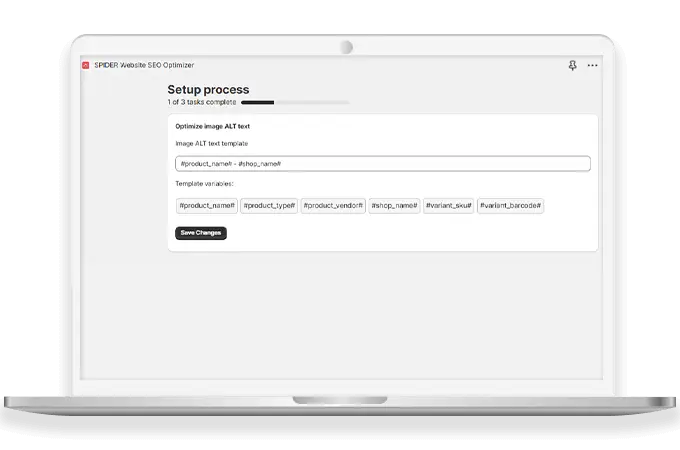
The app automatically assigns SEO-friendly ALT texts to images, improving their relevance and visibility to search engines. This helps in better indexing and ranking of the website.
Optimize Image Filename Convention
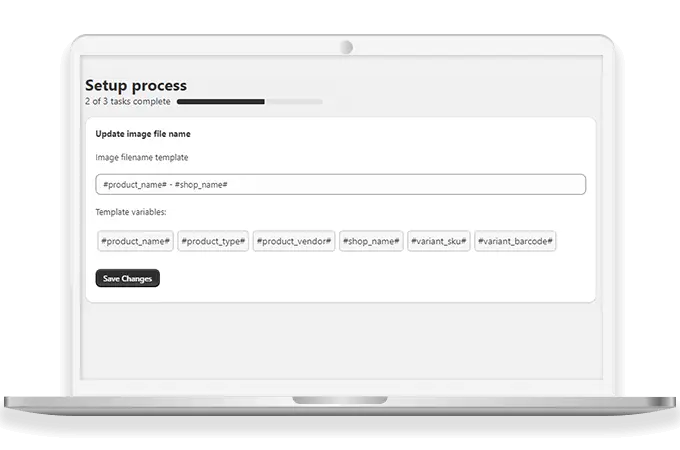
The app standardizes image filenames according to SEO best practices, further improving the website's SEO score and rankings. Search engines often consider filenames when determining the relevance of images to a particular search query.
Make use of Dynamic Variables
SPIDER allows for the creation of ALT tags and filenames using dynamic variables, providing flexibility and customization options to suit different requirements.

Bulk or Specific Image Optimization
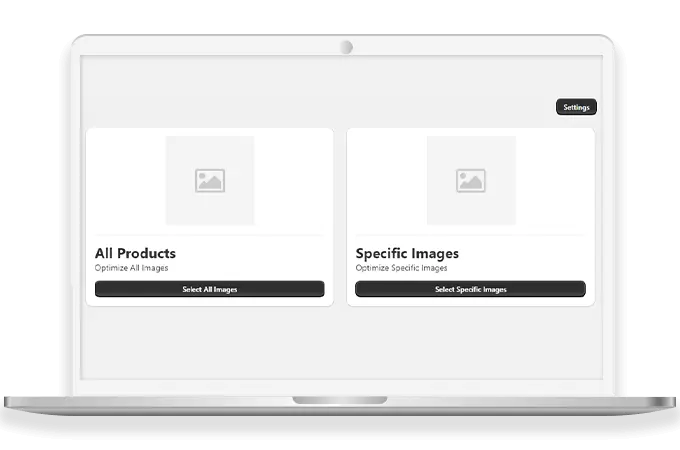
Merchants can optimize all images on their store or choose specific images for optimization with just a single click, streamlining the optimization process and saving time.
Why Choose SPIDER Website SEO Optimizer Shopify App by MageComp?