

CHARGIFY Product Fee Surcharge
CHARGIFY Product Fee Surcharge app allows merchants to charge extra costs on orders for additional services like gift wrapping, custom packaging, quick delivery, etc.
- Charge additional processing fee on shopping carts.
- Calculate additional fees as either a fixed amount or a percentage-based amount.
- Set rules and conditions for deciding when and how the fee should be applied.
- Set custom label of the surcharge amount on the front store.
- Increase average order amount with additional costs.
Extension Screenshots
Add Extra Fees.
Cover Costs.
Grow Your Revenue.
Add fixed or percentage-based fees to Shopify orders with flexible rules, custom fee labels, and automatic fee calculation at checkout.
Not Every Order Has the Same Cost
Extra services, special handling, rush processing and operational expenses can quickly increase your order costs. CHARGIFY gives you a flexible way to recover those expenses through configurable fees.
Extra Operational Costs
Some orders require additional handling, packaging or processing that standard product prices do not cover.
Different Customer Requirements
Customers may request premium services that need additional charges beyond the regular order value.
Create Rules. Apply Fees. Stay Flexible.
Configure your fee logic and let CHARGIFY automatically calculate the appropriate surcharge for qualifying orders.
See how it works →Everything You Need to Manage Extra Fees
Build a fee strategy that fits the way your Shopify store operates.
Fixed Fees
Add a predefined fee amount whenever your selected conditions are satisfied.
01Percentage Fees
Calculate charges dynamically using a percentage of the order value.
02Conditional Rules
Decide when a fee should apply based on your configured conditions.
03Automatic Calculation
Let the app calculate applicable fees automatically instead of handling them manually.
04Custom Fee Labels
Use meaningful fee names so customers can clearly understand additional charges.
05Transparent Charges
Present applicable additional charges clearly during the customer's purchase journey.
06Build Your Fee Logic at a Glance
Create a simple fee rule and visualize how CHARGIFY transforms it into an automatically calculated order charge.
From Order Condition to Fee in Seconds
CHARGIFY turns your predefined rules into a simple automated flow.
Turn Extra Services Into Simple Charges
Whether you sell products, services or customized orders, CHARGIFY helps you add fees around the way your business operates.
Gift Wrapping
Add a fee when customers select premium gift wrapping or presentation services.
Special Handling
Recover additional handling and packaging costs for selected orders.
Priority Processing
Charge customers for expedited or priority order processing.
Custom Services
Add charges for customization, installation or other optional services.
Operational Costs
Use additional fees to help recover specific operational expenses.
B2B Requirements
Create fee rules that support different business order requirements.
More Control Over Every Additional Charge
Stop handling special charges manually. Create your fee logic once and let CHARGIFY manage the calculation for qualifying orders.
Start Using CHARGIFY →Choose fixed or percentage-based charges.
Recover expenses linked to additional services.
Automate fee calculation using configurable rules.
Give customers visibility into additional charges.
Set Up Your Fee Strategy in Three Steps
Configure Your Fee
Define the fee type, amount and customer-facing label according to your store's requirements.
Set Your Conditions
Create the rules that determine when an additional charge should be applied.
Let CHARGIFY Calculate
Once the conditions are met, the applicable fee is automatically calculated as part of the checkout flow.
Questions About CHARGIFY?
Find quick answers about adding and managing additional fees in your Shopify store.
CHARGIFY Extra Fee is a Shopify app that lets merchants add fixed or percentage-based additional fees to qualifying orders using configurable rules.
Yes. CHARGIFY supports percentage-based fees, allowing the additional charge to be calculated dynamically according to the configured order conditions.
Yes. You can configure fixed additional charges for selected orders or applicable conditions.
Yes. You can configure conditions to control when a fee should be applied to an order.
Yes. Custom fee labels help you clearly communicate the reason for an additional charge to customers.
CHARGIFY is useful for Shopify merchants who need to collect additional charges for services, handling, customization, processing or other order-related costs.
Turn Every Additional Service
Into a Smarter Revenue Opportunity.
Create flexible fee rules and automate additional charges with CHARGIFY Extra Fee for Shopify.
Get CHARGIFY Extra Fee →Merchants may need to apply specific fees or surcharges based on unique business requirements. Merchants often incur additional costs for various services, such as expedited shipping, gift wrapping, or custom orders. Adding these costs into the product amount makes the product expensive. This Shopify app helps manage surcharges on orders.
CHARGIFY Product Fee Surcharge plug-in provides merchants with a comprehensive solution to implement and manage additional fees on their Shopify store. Charge fees as a fixed amount or on a percentage basis. Set rules and regulations to apply additional charges to shopping carts. Show custom titles for additional fees in order to build the transparency and trust of customers. Additional checkout charges can increase the average order value of your store.
: CHARGIFY Product Fee Surcharge for Shopify Features Highlights :
Apply Additional fees to Customers' Orders
CHARGIFY Product Fee Surcharge Shopify add-on can help include additional charges on your store orders effortlessly.
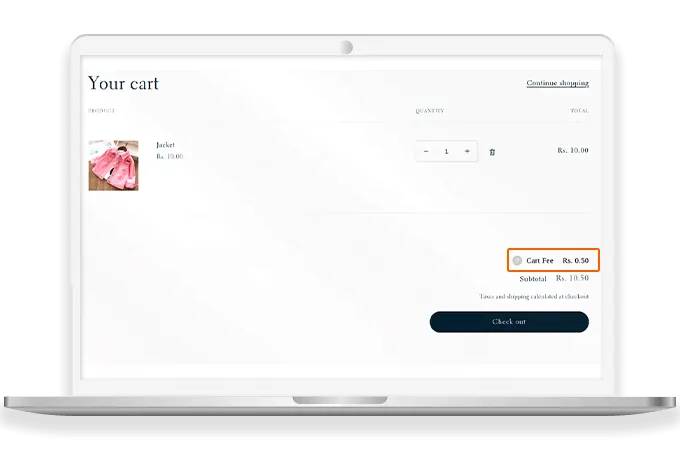
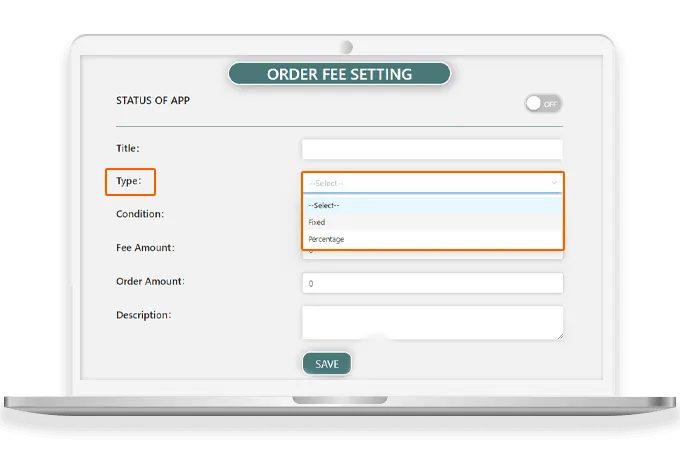
Accepted Fee Type - Fixed or Percentage-based
This CHARGIFY Product Fee Surcharge Shopify plugin provides with the option to charge extra fees as a fixed amount or on the basis of percentage value.
Apply Rules for Charging Extra Fees
Store owners have the ability to set conditions based on which the additional costs will be charged on orders.
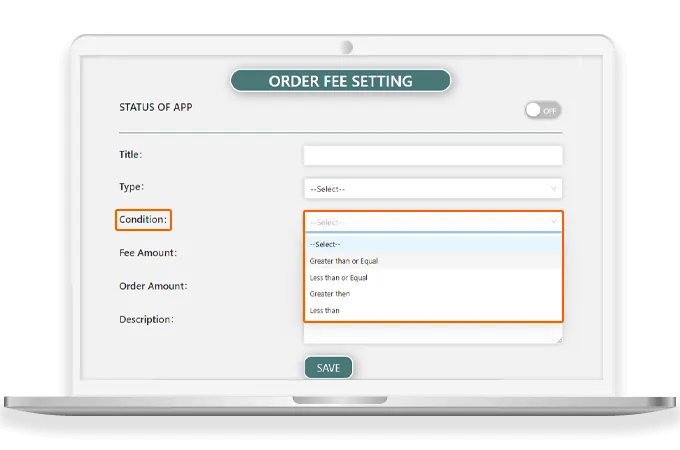
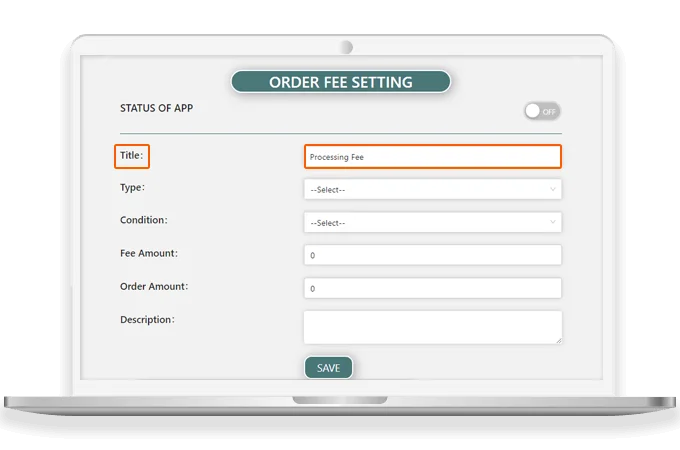
Descriptive Title for Surcharge
The backend settings include setting a custom and understandable label for additional charges to create transparency with customers.
Why Choose CHARGIFY Product Fee Surcharge App by MageComp?
- Easily charge extra fees on orders.
- Display additional charges at the checkout page separately.
- Set fee type as fixed or percentage based on your store requirements.
- Define rules and conditions to determine how and what charges to apply..
- Set a custom label for the surcharge amount.
- Increase AOV (Average Order Value) of your Shopify store by adding extra charges on orders.
- Boost store revenue by strategically using surcharges.