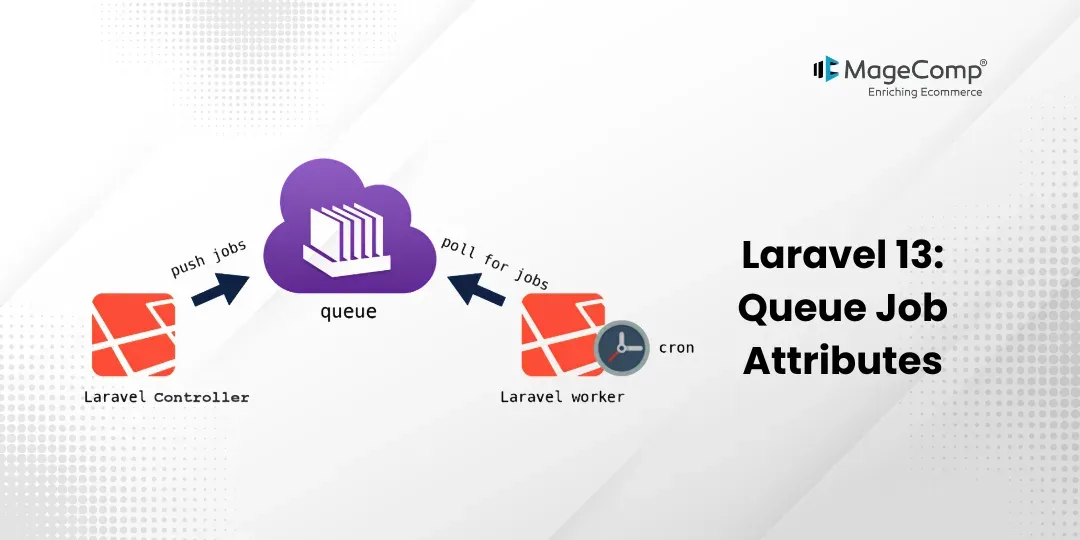
The ability to process asynchronously in the background is one of Laravel’s greatest capabilities, and with the launch of Laravel 13, queuing operations have become much more powerful and easier to manage through Queue Job Attributes.
The new attribute-based approach to defining the configuration of queues simplifies the development experience for programmers by providing a method to define queue configuration attributes directly in the job class rather than as numerous class properties. These attributes allow you to produce cleaner, more maintainable code in large applications.
This tutorial will focus on creating a working example of how to utilize the new Laravel 13 Attribute feature for creating Queue Jobs.

Steps for Laravel 13 Queue Job Attributes Example
- Step 1: Install Laravel 13
- Step 2: Configure Database Queue
- Step 3: Create Job
- Step 4: Create Route
- Step 5: Dispatch Queue Job
- Step 6: Run Queue Worker
- Run Laravel App
Step 1: Install Laravel 13
Before getting started, download and install Laravel 13 via the command below.
composer create-project laravel/laravel example-appStep 2: Configure Database Queue
Now configure the queue connection.
Update the .env file:
QUEUE_CONNECTION=databaseNow, create the queue jobs table using the following command:
php artisan queue:table
Run migration:
php artisan migrate
Step 3: Create Job
To create a queue job, run the command below:
php artisan make:job SendWelcomeEmailJobNow update the following code in
app/Jobs/SendWelcomeEmailJob.php
<?php

namespace App\Jobs;

use Illuminate\Contracts\Queue\ShouldQueue;
use Illuminate\Foundation\Queue\Queueable;
use Illuminate\Queue\Attributes\WithQueue;

#[WithQueue(
    connection: 'database',
    queue: 'emails',
    tries: 3,
    timeout: 60
)]

class SendWelcomeEmailJob implements ShouldQueue
{
    use Queueable;

    /**
     * Create a new job instance.
     */
    public function __construct(
        public string $email
    ) {
        //
    }

    /**
     * Execute the job.
     */
    public function handle(): void
    {
        \Log::info('Welcome email sent to: '.$this->email);
    }
}
Why This is New in Laravel 13?
Originally, the queue configuration in Laravel used to look like this:
public $connection = 'database';
public $queue = 'emails';
public $tries = 3;
public $timeout = 60;
Now in Laravel 13, you can simply define your configuration via one attribute, making your code cleaner and less cluttered.
#[WithQueue(
    connection: 'database',
    queue: 'emails',
    tries: 3,
    timeout: 60
)]
Step 4: Create Route
Now, create a route for dispatching the queue job.
Update the following code in:
routes/web.php
<?php
use Illuminate\Support\Facades\Route;
use App\Jobs\SendWelcomeEmailJob;
Route::get('send-email', function () {
    SendWelcomeEmailJob::dispatch('admin@example.com');
    return 'Queue Job Dispatched Successfully';
});
Step 5: Dispatch Queue Job
Now open the following URL in your browser:
http://127.0.0.1:8000/send-email
After opening the URL, the queue job will be stored in the jobs table.
Step 6: Run Queue Worker
Now run the queue worker using the following command:
php artisan queue:workAfter running the worker, Laravel will process the queue job.
You can check the log file here:
storage/logs/laravel.log
Welcome email sent to: admin@example.com
Run Laravel App
Now run the Laravel application using:
php artisan serveConclusion
With Laravel 13, job attributes are created using PHP Attributes, which makes code more legible and easy to maintain and allows for improved organization and structure.
If you are already using Queues via Laravel, then taking advantage of this feature will create a more efficient and future-proofed codebase.

FAQ
1. What are Queue Job Attributes in Laravel 13?
Attributes are a way to document the properties of a job (such as retries, timeouts, etc.) via annotation in PHP 8 by placing them directly in the class of jobs.
2. Can I still use the old method of defining attributes?
Yes! Laravel is backward-compatible; thus, both ways of configuring a job are supported equally.
3. Are Queue Job Attributes a requirement in Laravel 13?
They are not required; however, it is recommended to create a clean, modern code base.