Keep Customers Informed
Share timely messages about key order events so customers know what to expect next.

The All in One SMS Notifications Shopify App by MageComp allows the Shopify merchants to send order-related notifications to customers with the help of their own sender ID and their desired SMS Gateway service provider.
Deliver timely order updates, shipping alerts, abandoned checkout reminders, and review requests through SMS. Customize messages, connect your preferred SMS gateway, and manage customer communication directly from your Shopify store.
Customers want to know what happens after checkout. OKURU Order SMS helps your store share relevant updates throughout the purchase journey, from order confirmation to shipping, delivery, and beyond.
Share timely messages about key order events so customers know what to expect next.
Customize supported SMS templates to match your store's communication style.
Use automated notifications, manual messages, and bulk SMS tools for different needs.
Bring order notifications and customer messaging into one convenient Shopify workflow with OKURU Order SMS.
Send SMS updates for supported order events, including order placement and fulfillment.
Keep customers informed with shipping fulfillment and available delivery-status notifications.
Personalize supported messages to communicate order details and customer information clearly.
Send checkout recovery messages to encourage customers to return and complete eligible purchases.
Broadcast store updates and promotional messages to selected customer groups, tags, or segments.
Send a custom message for a specific order when a personal follow-up is needed.
Notify customers about supported refund and cancellation events with relevant SMS messages.
Follow up with customers using review-request SMS to encourage feedback after their purchase.
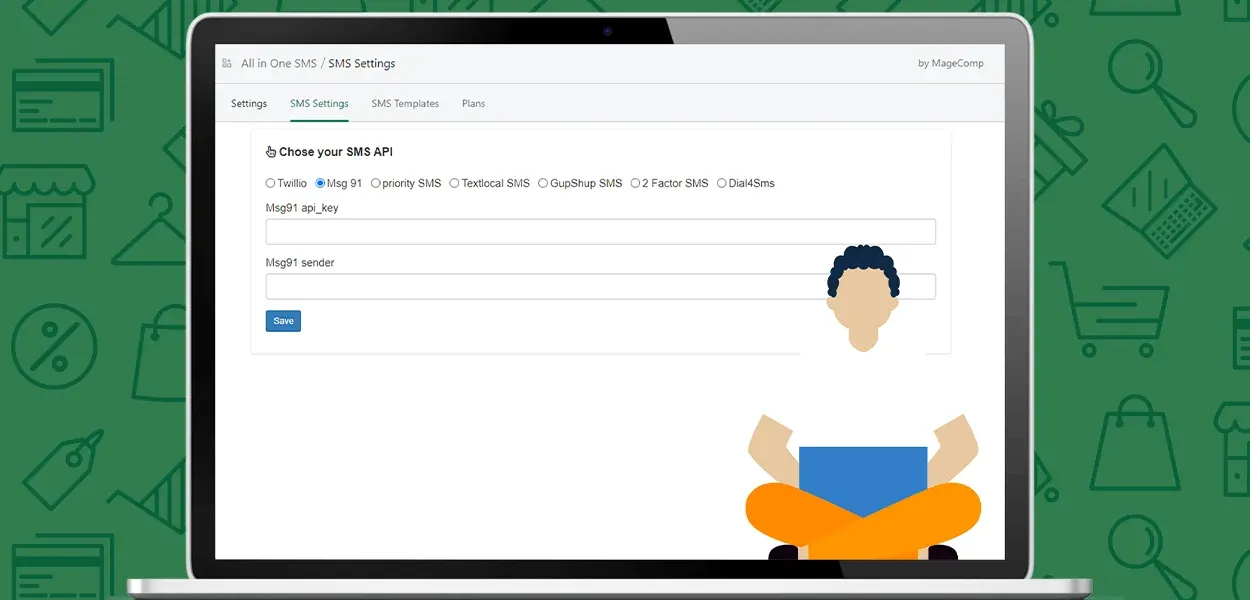
Choose from supported SMS API gateways and use your own sender ID where supported.
Build a consistent communication experience by sharing the right update at the right stage. OKURU helps you manage supported transactional messages and customer follow-ups from your Shopify admin.
Connect an available SMS API provider that fits your business and region.
Provider availability, setup requirements, and messaging charges may vary. Check the app listing for the latest supported integrations.
Generic messages can leave customers searching for context. Use supported template variables and custom message content to make order updates more useful and recognizable.
Illustrative copy only. Use the actual variables supported by your configured OKURU template and SMS gateway.
Send relevant store announcements and promotional messages to selected customer groups instead of managing every message individually.
Target supported customer groups, tags, or segments for more relevant communication.
Write an appropriate store update, offer announcement, or relevant customer message.
Use the available bulk messaging functionality to reach your selected audience.
Give your team a practical way to coordinate order communication and customer outreach within the Shopify workflow.
Automate supported notifications instead of manually sending every routine order update.
Give shoppers clearer information about order progress and relevant next steps.
Use an available gateway that suits your messaging needs and operational setup.
Manage supported notification templates with a consistent store voice.
Use timely post-purchase updates and review requests to maintain customer engagement.
Manage automated order SMS, manual messages, and supported bulk campaigns through one app.
Start with your Shopify admin and configure the messaging options needed for your store.
Open OKURU Order SMS on the Shopify App Store and install it on your store.
Choose an available provider and enter the credentials and sender details it requires.
Set up supported message templates and order events, then test the configuration before use.
Learn more about order notifications, message customization, and SMS integrations.
OKURU Order SMS is a Shopify app by MageComp that helps merchants send customer SMS notifications for supported order events, shipping, refunds, cancellations, abandoned checkouts, and review requests. It also offers manual messaging and bulk SMS features.
Supported notifications include order placement, fulfillment, refunds, cancellations, abandoned checkouts, shipment updates, and review requests. Availability depends on your plan and configuration.
OKURU offers customizable SMS templates on supported plans. You can tailor message content and use the template variables available in the app.
OKURU supports multiple SMS API gateways. Refer to the current Shopify App Store listing and in-app settings for the latest provider list and setup requirements.
Using your own sender ID depends on the selected SMS gateway, sender registration, destination country, and applicable messaging regulations.
Supported plans offer bulk messaging functionality for selected customer groups, tags, or segments. Follow applicable messaging consent and opt-out requirements.
OKURU includes abandoned checkout SMS functionality on a supported plan. Configured messages can encourage eligible shoppers to return and complete their purchases.
SMS provider charges may be separate from the app subscription. Review your selected gateway's pricing and the current Shopify App Store listing for applicable subscription and usage charges.
You can explore complementary WhatsApp solutions for your store. Visit KOOL WhatsApp Notifications or WhatsApp Notifications & Chatbot to compare their capabilities with your SMS requirements.
Check the current Shopify App Store listing for available plans, feature limits, pricing, and trial availability.
Sending SMS Notification to customers is inevitable for E-commerce store owners to serve customers efficiently. SMS has a 98% open rate, hence they get seen instantly. SMS gives you a greater ability to stay connected with customers in their order process. With higher open rates, SMS marketing is a reliable tool for E-commerce stores to increase the customer experience of the store. Additionally, SMS does not rely on an internet connection, hence you can stay connected with your customers even when their mobile data is off. Shopify store owners need not worry about sending SMS notifications to customers as MageComp has come up with the All in One SMS Notifications Shopify App.
The All in One SMS Notifications App for Shopify by MageComp allows the store owners to send order, shipment, delivery, and abandoned cart notifications to customers via SMS using their own SMS sender ID. The app supports 7 SMS API Gateway service providers to choose from. The Shopify owners can send 7 different types of SMS to customers. The SMS can be personalized using the variables to improve the user experience of the Shopify store.
With our SMS Notification Shopify App, you can send notifications to customers via text message using your own sender ID.


The All in One SMS Notifications Shopify App includes major SMS API Gateway services, providers. You can select your preferred SMS API from the below ones:
The Shopify store owners are able to send various order and shipment-related notifications to customers by using the All in One SMS Notifications Shopify App. The types of notifications include the following: