



Magento 2 hCaptcha Extension
Protect your Magento 2 store from spam, bots, fake registrations, and malicious login attempts using advanced hCaptcha security. The Magento 2 hCaptcha Extension by MageComp allows you to secure both frontend and backend forms with hCaptcha while maintaining a seamless user experience.
- Enhanced security of your Magento store.
- Prevent your store frontend and admin panel from spam and bots.
- Secure 13 frontend forms with a single configuration.
- Protect the Magento admin login and forgot password pages.
- Add hCaptcha to custom CMS pages and static blocks.
- Available in 2 themes - dark & light.
- Resize the hCaptcha box according to your needs.
- Integration of hCaptcha security with frontend pages.
- Implement hCaptcha mechanism on backend pages.
- IP whitelist support for trusted users/admins.
- REST API Available / GraphQL API Available.
- Hyvä Addon Available.
- Compatible with Hyvä Luma Checkout / Hyvä Checkout.


30 DAY
MONEY BACK

1 YEAR
FREE UPGRADE

1 YEAR
FREE SUPPORT
Extension Screenshots

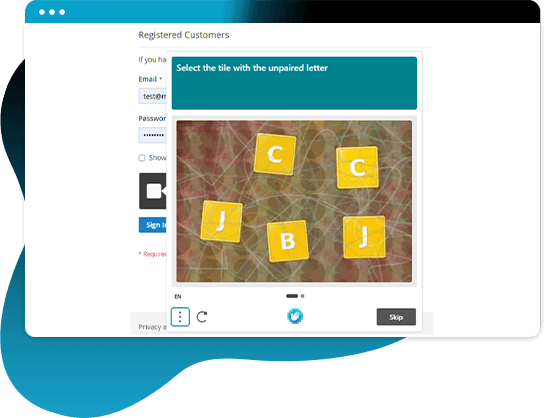
Spammers are upgrading themselves to target eCommerce websites, as the old methods are no longer able to do the job. hCaptcha takes care of the privacy of the users & eCommerce websites. It provides simple, effortless, and flexible spam bot detection when human beings are solving it. It offers a better customer experience and keeps spammers away.
MageComp's Magento 2 hCaptcha extension helps store owners protect their Magento store from bots and spammers. The store owner can add the hCaptcha to multiple pages of the frontend and backend of their store. Additionally, the extension supports hCaptcha for custom CMS forms and static blocks. There are 2 themes available (light theme and dark theme) for changing the appearance of the hCaptcha option. The admin can customize the hCaptcha box size as compact or normal according to the requirement. There is an option to Whitelist specific IP addresses to bypass hCaptcha verification for trusted admins or internal teams.
Benefits of Magento 2 hCaptcha Extension
Secured Magento Store with hCaptcha
hCaptcha helps protect your Magento 2 store. It is more secure than reCAPTCHA and takes care of the privacy of the users effectively.
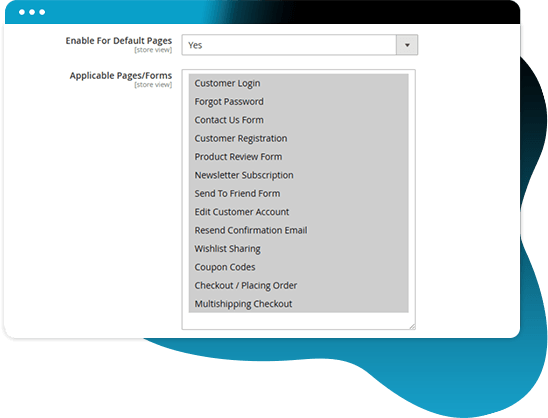
Secure Multiple Frontend Pages/Forms
The following 13 frontend forms are secured by default.
- Customer Login
- Forgot Password
- Contact Us Form
- Customer Registration
- Product Review Form
- Newsletter Subscription
- Send to Friend Form
- Edit Customer Account
- Resend Confirmation Email
- Wishlist Sharing
- Coupon Codes
- Checkout / Placing Order
- Multishipping Checkout
Magento Admin Panel Form Protection
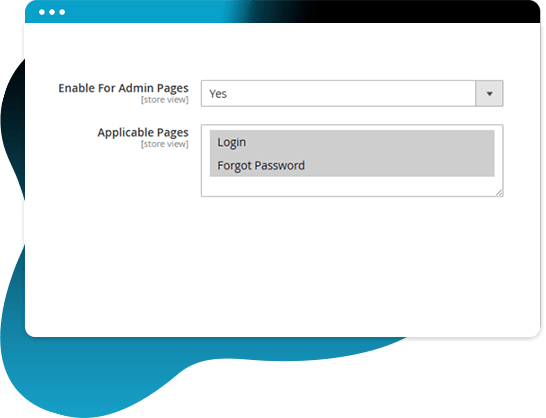
The following admin forms are secured by default.
- Admin Login
- Admin Forgot Password
Support for Custom Forms
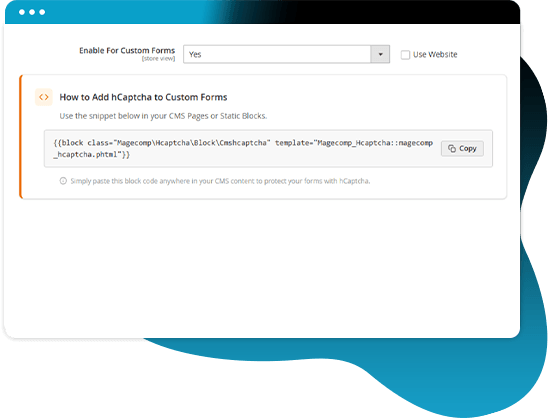
Easily add hCaptcha to CMS pages and static blocks using the provided block snippet.
Customize the Look of hCaptcha Box
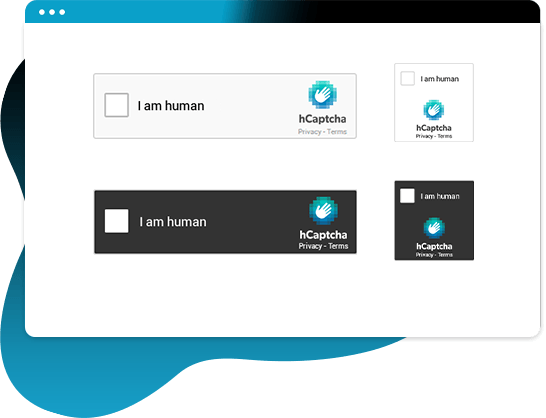
Personalize the appearance of the hCaptcha box according to your requirements. It has the following styles.
- Dark Mode - Normal
- Dark Mode - Compact
- Light Mode - Normal
- Light Mode - Compact
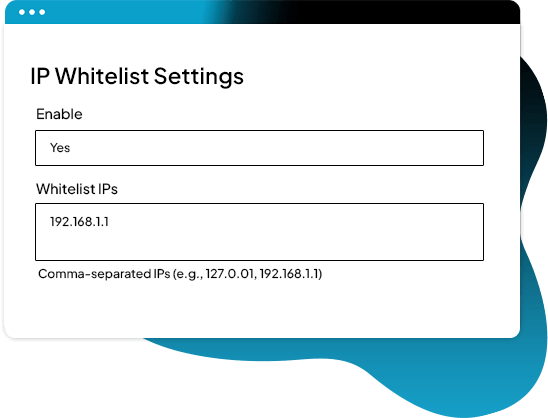
Bypass hCaptcha Verification for Trusted IPs
The extension includes an option to add trusted IPs to the whitelist, skipping verification and providing uninterrupted access for internal teams or verified users.
Protection Against Spam
It's powerful and advanced, preventing spammers from accessing your store and helping your customers feel safe.

Why Choose MageComp’s Magento 2 hCaptcha Extension?
- Enhanced security for protecting from spammers and bots.
- Eliminate spam bots from your website.
- Follow the human protocol and respect human privacy.
- 2 options for resizing the hCaptcha box (Normal & Compact).
- 2 themes available (light and dark).
- Implement on multiple frontend & backend pages.
- Implement for custom CMS forms and blocks.
- Trusted IP whitelist functionality.
- Increase customer experience and boost your conversion rates.
Version 1.0.5 Date : 29-05-2026
- Compatible with Checkout & Multishipping Checkout
- Compatible with 13+ Frontend Forms
- Added Whitelist IP functionality
- Improved REST API and GraphQL API
- Compatible with Magento 2.4.9 version
Version 1.0.4 Date : 13-05-2025
- Compatible with Magento 2.4.8 version
- Minor bug fixing
Version 1.0.3 Date : 11-09-2024
- Improved REST API and GraphQL API
- Compatible with Magento 2.4.7 version
Version 1.0.2 Date : 29-03-2023
- Compatible with Magento 2.4.6 version
- Minor bug fixing
Version 1.0.1 Date : 21-06-2022
- Added REST API and GraphQL API
- Checkout page hCaptcha issue solved
- Compatible with the latest Magento 2.4.4 version
- Compatible with Magento Coding Standards