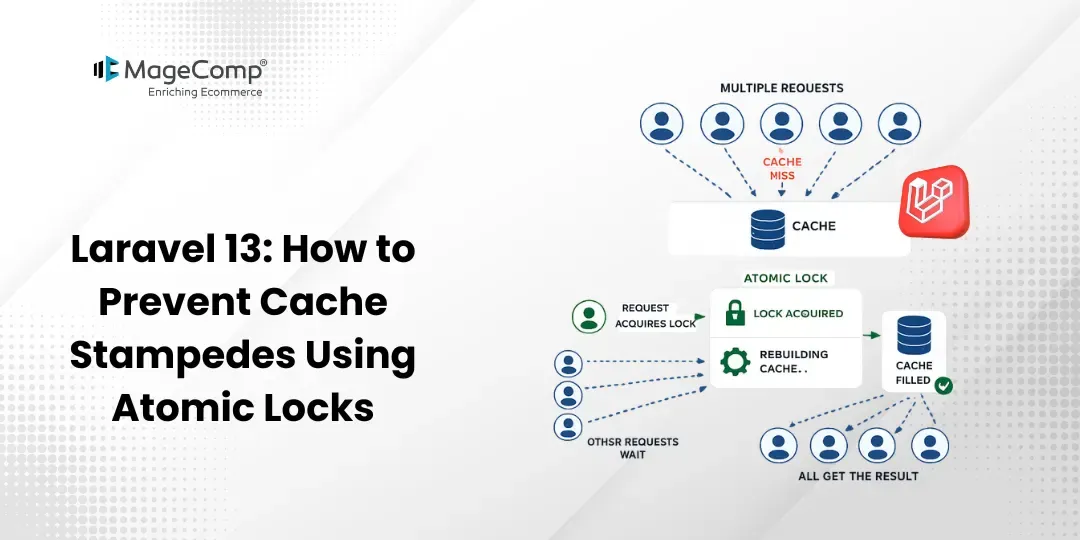
Hi, in this blog post, we’ll discuss how to avoid cache stampedes with the use of Atomic Locks in a Laravel 13 application. Atomic Locks are useful in making sure that only one request generates and caches the expensive data.

Prerequisite:
1. Composer (latest Version)
2. Laravel version 13
Steps to Prevent Cache Stampedes Using Atomic Locks in Laravel 13:
Step 1: Install Laravel 13
Step 2: Set Database Details and Migrate
Step 3: Configure Cache Driver
Step 4: Create Routes
Step 5: Create Controller
Step 6: Create Blade File
Step 7: Test Project
Now, let’s see all the steps with the detailed information.
Step 1: Install Laravel 13
In order to test this demo, you need a new project; create one with the following command.
composer create-project laravel/laravel:^13.0 atomic-lock-demoStep 2: Set Database Details and Migrate
Set the database details in .env with your own credentials and execute the following command to migrate the database.
php artisan migrateStep 3: Configure Cache Driver
Atomic locks are supported with Cache Drivers such as Redis, Memcached, DynamoDB, Database, File, and Array.
Update your .env file
CACHE_STORE=fileYou can also use Redis:
CACHE_STORE=redisStep 4: Create Routes
Now, create routes for generating reports.
routes/web.php
<?php
use Illuminate\Support\Facades\Route;
use App\Http\Controllers\ReportController;
Route::get('/', [ReportController::class, 'index']);
Step 5: Create Controller
Here, we will create ReportController. Use the command to create the controller.
php artisan make:controller ReportControllerapp/Http/Controllers/ ReportController.php
<?php
namespace App\Http\Controllers;
use Illuminate\Support\Facades\Cache;
class ReportController extends Controller
{
    /**
     * Generate report and cache the result
     */
    public function index()
    {
        $report = Cache::get('report_data');
        if (!$report) {
            $lock = Cache::lock('report_generation_lock', 10);
            if ($lock->get()) {
                try {
                    // Simulate expensive operation
                    sleep(5);
                    $report = [
                        'total_users' => 1200,
                        'total_orders' => 4500,
                        'revenue' => '$50,000'
                    ];
                    Cache::put('report_data', $report, 60);
                } finally {
                    $lock->release();
                }
            } else {
                return "Report is being generated by another request. Please try again.";
            }
        }
        return view('report', compact('report'));
    }
}
Step 6: Create Blade File
Now, create a blade file.
resources/views/report.blade.php
<!DOCTYPE html>
<html>
<head>
    <title>Atomic Lock Example</title>
</head>
<body>
<h2>Dashboard Report</h2>
<ul>
    <li>Total Users : {{ $report['total_users'] }}</li>
    <li>Total Orders : {{ $report['total_orders'] }}</li>
    <li>Revenue : {{ $report['revenue'] }}</li>
</ul>
</body>
</html>
Step 7: Test Project
Now, run the Laravel app:
php artisan serveGo to your web browser and enter the following URL to see the output of the app:
If multiple users hit the page simultaneously, Laravel atomic locks ensure that a single request generates a report and caches it. All other requests need to wait until the cache is available to prevent cache stampedes.
Conclusion:
It is very easy to create scalable Laravel applications by leveraging caching techniques and atomic locks. Regardless of whether you are caching reports, dashboard data, API data, or complex queries, using atomic locks is an extremely easy and efficient method of safeguarding your application.

FAQ
1. What is a Cache Stampede?
Cache stampede means a situation in which there are many requests trying to regenerate a cache entry that expires.
2. What are atomic locks in Laravel?
Atomic locks are synchronization techniques that enable only one process to execute certain code at a particular point in time.