Doing repetitive tasks manually consumes the precious time of the developer in the WordPress development environment. It could be anything like clearing cache files, scheduling emails, API synchronization, or cleaning up old log entries, but in all cases, WordPress Cron Jobs come to help.
In this article, you will learn to develop your cron jobs in WordPress using wp_schedule_event(). You will learn to create custom time intervals, run automated background processes, delete scheduled events, and develop a live example where the cron job automatically deletes expired posts on a daily basis.
The guide will serve you well if you’re developing any plugin or theme that requires automation in repetitive tasks within WordPress.

What Does This Example Do?
This example does the following:
- Creates a custom cron schedule time interval
- Schedules an event on a daily basis
- Automatically checks whether the posts have expired
- Moves the posts to the trash bin
- Logs all cron job activity
- Clears scheduled cron jobs when the plugin is deactivated
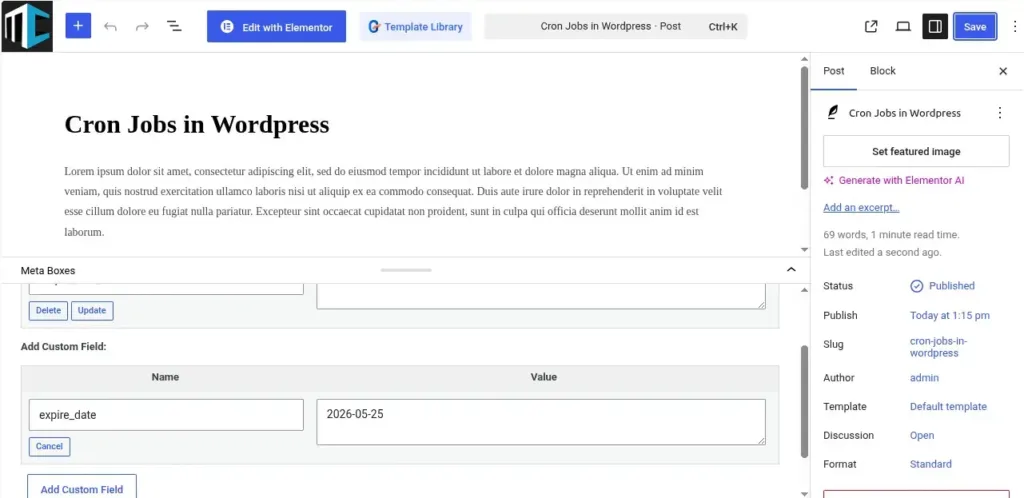
In this tutorial, expired posts are identified using a custom meta field called:
expiry_date
If the expiry date is older than the current date, the post automatically goes to the trash.
Steps to Create Custom Cron Jobs in WordPress:
Step 1: Create a Custom Plugin Folder
wp-content/plugins/magecomp-custom-cron/
Create a PHP file inside it:
magecomp-custom-cron.php
Step 2: Add Plugin Header
<?php

/**
* Plugin Name: MageComp Custom Cron Example
* Description: Demonstrates custom cron jobs in WordPress.
* Version: 1.0
* Author: MageComp
*/

if ( ! defined( 'ABSPATH' ) ) {
    exit;
}
Step 3: Create Custom Cron Interval
WordPress provides hourly, twice daily, and daily as default options.
Now, let us see how to schedule a custom one:
add_filter( 'cron_schedules', 'magecomp_custom_cron_interval' );
function magecomp_custom_cron_interval( $schedules ) {
     $schedules['every_five_minutes'] = array(
         'interval' => 300,
         'display'  => __( 'Every Five Minutes' )
     );
    return $schedules;
}
This will schedule a custom event, which runs every 5 minutes.
Step 4: Schedule the Cron Event
register_activation_hook( __FILE__, 'magecomp_schedule_cron_job' );
 function magecomp_schedule_cron_job() {
      if ( ! wp_next_scheduled( 'magecomp_delete_expired_posts_event' ) ) {
    wp_schedule_event(time(),'daily','magecomp_delete_expired_posts_event');
      }
 }
Explanation:
- time() → The current timestamp
- daily → Executes daily once
- magecomp_delete_expired_posts_event → Custom cron hook
Step 5: Create the Cron Callback Function
add_action(
    'magecomp_delete_expired_posts_event',
    'magecomp_delete_expired_posts_callback'
);

function magecomp_delete_expired_posts_callback() {
    $today = current_time( 'Y-m-d' );
    $args = array(
        'post_type'      => 'post',
        'post_status'    => 'publish',
        'posts_per_page' => -1,
        'meta_query'     => array(
            array(
                'key'     => 'expiry_date',
                'value'   => $today,
                'compare' => '<',
                'type'    => 'DATE'
            )
        )
    );

    $expired_posts = get_posts( $args );
    if ( ! empty( $expired_posts ) ) {
        foreach ( $expired_posts as $post ) {
            wp_trash_post( $post->ID );
            error_log(
                'Expired post moved to trash. Post ID: ' . $post->ID
            );
        }
    }
}
Step 6: Add Expiry Date to Posts
Manually enter a custom field in the post editor:
Field Name: expiry_date
Field Value: 2026-05-01
The post will be automatically deleted once this date is older than the current date using a cron task.
Step 7: Clear the Scheduled Cron on Plugin Deactivation
register_deactivation_hook(
    __FILE__,
    'magecomp_clear_cron_job'
);

function magecomp_clear_cron_job() {
    $timestamp = wp_next_scheduled(
        'magecomp_delete_expired_posts_event'
    );
    wp_unschedule_event(
        $timestamp,
        'magecomp_delete_expired_posts_event'
    );
}
This avoids unnecessary cron jobs once the plugin gets deactivated.
Output:
Real-Life Use Cases:
- Automated Deletion of Expired Offers
- WooCommerce Sale Cleanup
- Scheduled Email Notifications
- Database Cleanup
- API Synchronization
Conclusion
WordPress crons are very efficient in executing activities, such as database clean-ups or scheduled processes in WordPress. WP-Cron is one such feature that is bound to make your app smarter.
Based on your project requirements, you will have to integrate automatic deletion, emails, or even API integration into your project.
FAQ
1. What is WP-Cron in WordPress?
The WP-Cron is the built-in WordPress cron that helps schedule processes like data clean-ups.
2. How do I create a custom cron job in WordPress?
With the help of the wp_schedule_event() function, you can schedule a custom WP-cron and execute the action with your custom function.
3. Where should I add WordPress cron job code?
Always use custom WP-Cron inside a custom WordPress plugin rather than a theme.