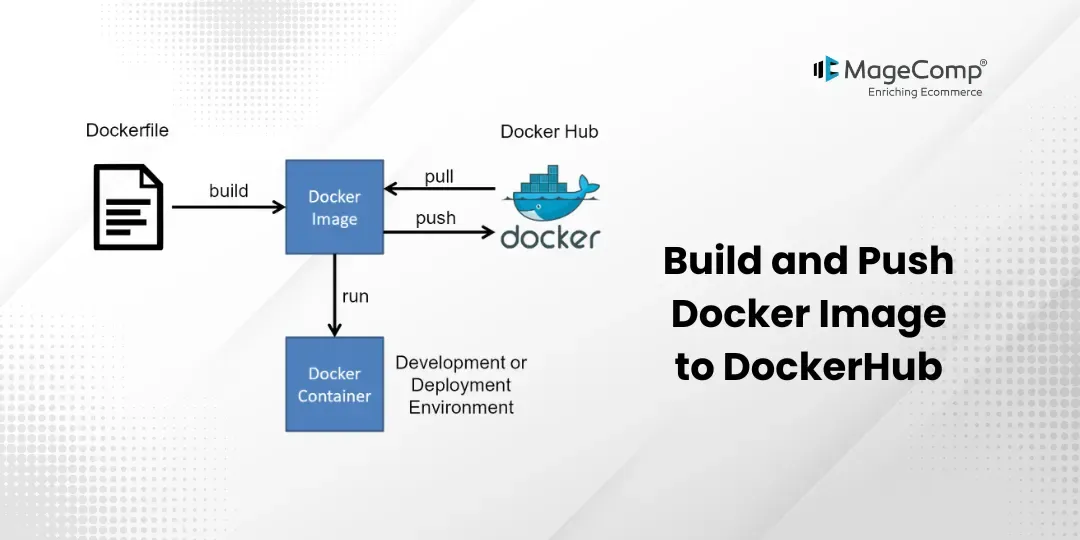
Laravel Docker images allow you to easily share your app with other developers and also help with the deployment of your application to production servers. The process of saving a Docker image to DockerHub (similar to cloud storage) allows you to easily store & share your containers. Other developers can download & use your Laravel app by simply pulling the image from DockerHub without any setup issues.
There are many benefits to pushing the image of your Laravel application to DockerHub; it is an extremely easy way to allow other team members access to the same version of the project or to deploy it on different servers. This guide will provide you with step-by-step instructions for building a single Docker image of your Laravel project and pushing that image to DockerHub. After this tutorial, your Laravel application will be available to anyone who wishes to use it.

Steps to Build and Push a Docker Image to DockerHub:
Step 1: Build Image
First, let’s build the Docker image from your Laravel app using the following command in your terminal:
docker build -t my-laravel-app:latest .Step 2: Log in to Dockerhub
Before you’re able to push images to DockerHub, you must first log in to your DockerHub account. Run this command:
docker loginAfter running the command, you’ll be prompted for your DockerHub username and password, and must provide both to proceed with your login.
Step 3: Tag the Image
After you log in to DockerHub, you can begin by tagging the Laravel image with your DockerHub username so it can be pushed. Use this command:
docker tag my-laravel-app:latest savanihd/my-laravelapp3:latestThis command will tag your local image with your DockerHub username. Replace “savanihd” with your own DockerHub username
Step 4: Push to Dockerhub
Finally, push your tagged image to DockerHub with this command:
docker push savanihd/my-laravel-app3:latestThis command will upload your Laravel Docker image to DockerHub, where others can download and use it.
Step 5: Run Laravel App
All the required steps have been done. Now, you have to type the command given below and hit enter to run the Laravel app:
php artisan serveThen open the browser and visit: http://localhost:8000
Now your Laravel Docker image will become publicly accessible via Docker Hub.
Conclusion:
Docker allows for consistent operation for all existing host systems by packaging an application with all its dependencies and settings. This allows the application to be run on a replica of the host environment. By pushing the image to DockerHub, you have a means of saving your container image in a central repository and accessing it later, which allows you to maintain the container image across different environments and to quickly re-create it from the image stored on DockerHub.

FAQ
1. What is DockerHub?
DockerHub is a cloud-based repository for storing, managing, and sharing Docker images. Developers can use DockerHub to distribute containerized applications easily.
2. Do I need a DockerHub account to push images?
You must create a DockerHub account before you can push an image; you also need to be logged in to the Docker CLI with your username and password.
3. What is a Docker image?
A Docker Image is a portable, self-contained software package that contains everything you need in order to operate an application, including the application code, runtime environment, associated libraries, and dependencies.