Modern WordPress development depends heavily on AJAX (Asynchronous JavaScript and XML), which enables data to be sent to and received from the server without reloading the page. This makes for faster, smoother, and more engaged users.
AJAX is a core part of WordPress development. Whether you’re validating a form, checking data availability, or submitting data without page reloads, you need to know how Ajax in WordPress works.

In this blog, you will get to know about the AJAX workflow, which contains WordPress hooks, jQuery, and nonces. The example demonstrates how to:
- Trigger AJAX from the frontend
- Handle requests securely on the server
- Return JSON responses
- Update the UI instantly without a page reload
What This Example Does:
- JavaScript sends an AJAX request to WordPress (admin-ajax.php) with the username and a security nonce.
- PHP code validates the nonce and input.
- WordPress checks if the username exists or not.
- The frontend updates the message in real time to green or red, depending on the response.
Frontend html markup
<div id="ajax-demo-wrapper">
    <input type="text" id="demo-username" placeholder="Enter username">
    <button id="check-username">Check Availability</button>
    <p id="ajax-response" style="margin-top:10px;"></p>
</div>
Here:
- #demo-username is an input field for username
- #check-username is a button to trigger Ajax
- # ajax-response is a placeholder for the message to display
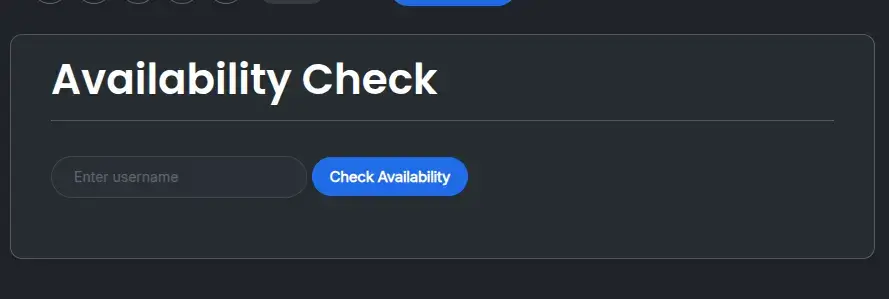
So here is how your frontend will look:
Enqueue Scripts
add_action('wp_enqueue_scripts', 'demo_ajax_enqueue_scripts');
function demo_ajax_enqueue_scripts() {

    // Load jQuery
    wp_enqueue_script('jquery');

    // Register the AJAX JS file
    wp_enqueue_script(
        'availability-ajax',
        get_stylesheet_directory_uri() . '/js/availability-ajax.js',
        array('jquery'),
        time(),
        true
    );

    // Pass AJAX URL and nonce to JS
    wp_localize_script('availability-ajax', 'availabilityAjax', array(
        'ajax_url' => admin_url('admin-ajax.php'),
        'nonce'    => wp_create_nonce('availability_ajax_nonce')
    ));
}
Here:
- wp_register_script() & wp_enqueue_script() → Ensures jQuery is loaded
- wp_localize_script() → passes ajax url & nonce to javascript
- The JS listens for button clicks, sends POST requests, and updates the UI
External JavaScript File (js/availability-ajax.js)
jQuery(document).ready(function ($) {
    $('#check-username').on('click', function () {
        let username = $('#demo-username').val();
        $('#ajax-response').text('Checking...');
        $.ajax({
            url: availabilityAjax.ajax_url,
            type: 'POST',
            dataType: 'json',
            data: {
                action: 'check_username_availability',
                nonce: availabilityAjax.nonce,
                username: username
            },
            success: function (response) {
                if (response.success) {
                    $('#ajax-response')
                        .css('color', 'green')
                        .text(response.data.message);
                } else {
                    $('#ajax-response')
                        .css('color', 'red')
                        .text(response.data.message);
                }
            }
        });
    });
});
Here:
- jQuery waits until the page is ready (document.ready)
- #check-username button click triggers an AJAX request
- It sends POST data: ‘action’, ‘nonce’, and ‘username’
- Receives JSON response from PHP handler
- Updates #ajax-response text dynamically in green (success) or red (error)
PHP AJAX Handler
add_action('wp_ajax_check_username_availability', 'demo_check_username');
add_action('wp_ajax_nopriv_check_username_availability', 'demo_check_username');

function demo_check_username() {
    if (!isset($_POST['nonce']) || !wp_verify_nonce($_POST['nonce'], 'availability_ajax_nonce')) {
        wp_send_json_error(array('message' => 'Security check failed'));
    }
    if (empty($_POST['username'])) {
        wp_send_json_error(array('message' => 'Username is required'));
    }
    $username = sanitize_user($_POST['username']);
    if (username_exists($username)) {
        wp_send_json_error(array('message' => 'Username already exists'));
    }
    wp_send_json_success(array('message' => 'Username is available'));
}
Here:
- add_action(‘wp_ajax_check_username_availability’, ‘demo_check_username’); → this line registers ajax action for logged in users
- add_action(‘wp_ajax_nopriv_check_username_availability’, ‘demo_check_username’) → this line registers ajax action for guest(non- logged-in users)
- Without these, Ajax will only work for logged-in users
- wp_verify_nonce() protects the Ajax request against CSRF attacks. If the nonce is missing or invalid, the request is immediately rejected.
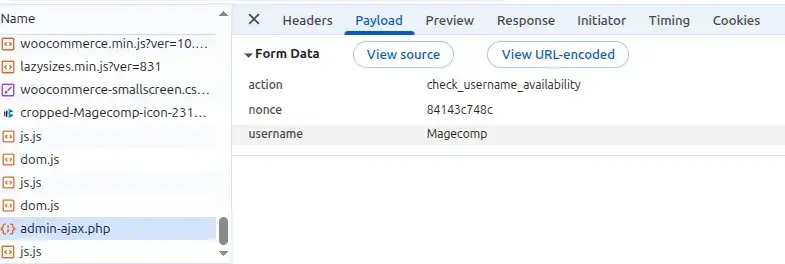
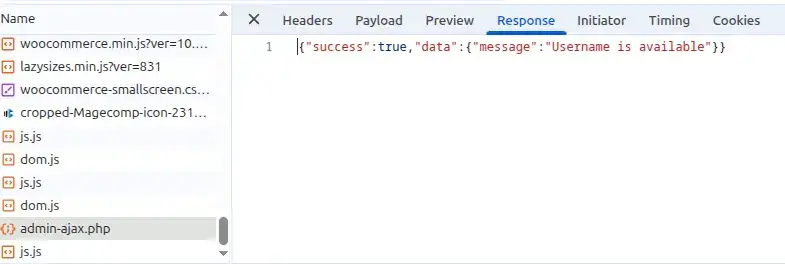
Look here in this image, when ajax request is made, and what’s been processed, what it shows in the Payload and Response tabs:

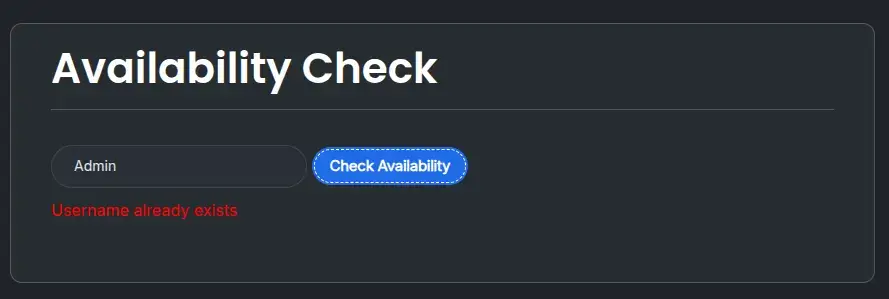
Results:
Success & Error messages

Real-Life Use Cases:
You can use Ajax in WordPress for different kinds of purposes, like:
- Form submissions
- Email availability checks
- Like-Dislike counts
- Dynamic searches
- Load more posts
Conclusion
As you can see, the AJAX workflow for working with WordPress is an effective way to create a state-of-the-art user experience on a modern website. By utilizing the way frontend JavaScript works with backend PHP via hooks, developers are able to create fast, responsive web features without affecting performance and/or overall user experience.
Mastering AJAX in WordPress should be at the top of any developer’s list of skills to acquire, regardless of if they are creating custom plug-ins and/or themes and/or building advanced user interface interactions.
FAQ
1. Can AJAX be used in WordPress plugins and themes?
Yes, if you utilize proper enqueuing for your scripts, it will function properly in both plug-ins and themes.
2. Does AJAX affect SEO?
AJAX itself doesn’t harm SEO, but content loaded via AJAX may not be indexed unless handled correctly (e.g., server-side rendering or proper crawlable URLs).
3. What is AJAX in WordPress?
AJAX allows web pages built with WordPress to speak directly with the server, and dynamically load different content to the page without having to refresh the whole page. This allows for increased performance and a better user experience.
4. Can AJAX be used on the frontend and backend?
Yes, you can use AJAX on both the front-end of a website to provide visitors with information, as well as in the WordPress admin area for the administrators and editors of the site.
5. Does AJAX improve website performance?
Yes, when using AJAX, you are only loading the data that is required on the page and will not be required to reload the entire website each time, as a result of which load times will decrease, and overall performance will be improved.