---
title: "How to Implement Multilingual Support in React Native App?"
url: "https://magecomp.com/blog/multilingual-support-react-native-app/"
date: "2025-04-23T12:57:41+00:00"
modified: "2025-04-23T12:57:43+00:00"
author:
name: "Bharat Desai"
url: "https://magecomp.com"
categories:
- "React Native"
word_count: 1017
reading_time: "6 min read"
summary: "In today’s globally connected world, offering multilingual support in your mobile app isn't just a nice-to-have feature—it’s essential. By adding multiple language options, you increase your ..."
description: "In today’s globally connected world, offering multilingual support in your mobile app isn’t just a nice-to-have feature—it’s essential.…"
keywords: "React Native"
language: "en"
schema_type: "Article"
related_posts:
- title: "React Native | Safe Area Context"
url: "https://magecomp.com/blog/react-native-safe-area-context/"
- title: "How to Add an App Force Update Popup in React Native?"
url: "https://magecomp.com/blog/add-app-force-update-popup-react-native/"
- title: "How to Open PDF Files in React Native App?"
url: "https://magecomp.com/blog/open-pdf-files-react-native-app/"
---
# How to Implement Multilingual Support in React Native App?
_Published: April 23, 2025_
_Author: Bharat Desai_

In today’s globally connected world, offering multilingual support in your mobile app isn’t just a nice-to-have feature—it’s essential. By adding multiple language options, you increase your app’s reach, improve user satisfaction, and show cultural sensitivity. If you’re building with React Native, the good news is that implementing multilingual support is straightforward with the right tools.
In this blog, we’ll walk you through the process of implementing multilingual support in a React Native app.
## Install the package using npm or yarn:
**Using npm:**
```
npm install react-native-localization
npm install react-redux
npm install redux
npm install redux-persist
npm install redux-saga
npm install @react-native-async-storage/async-storage
npm install react-native-modal
```
**Using yarn:**
```
yarn add react-native-localization
yarn add react-redux
yarn add redux
yarn add redux-persist
yarn add redux-saga
yarn add @react-native-async-storage/async-storage
yarn add react-native-modal
```
## iOS Setup
**Reinstall pod with**
```
cd ios && pod install && cd ..
```
## Example:
**(1) You have implemented a modular system by defining language resources in the following structure:**
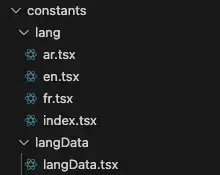**/constants/lang/index.tsx**
```
import LocalizedStrings from 'react-native-localization';
import EN from "./en";
import AR from './ar';
let strings = new LocalizedStrings({
EN,
AR
})
export default strings;
```
**/constants/lang/ar.tsx**
```
export default {
HOME: "الرئيسية",
PROFILE: "الملف الشخصي",
LOGIN: "تسجيل الدخول",
}
```
**/constants/lang/en.tsx**
```
export default {
HOME: "Home",
PROFILE: "Profile",
LOGIN: "Login",
}
```
**/constants/langData/langData.tsx**
```
export const langData: any = [
{
id: 1,
title: "English",
code: 'EN'
},
{
id: 2,
title: "Arabic",
code: 'AR'
},
]
```
**(2) Create a lang modal and LeftTextRightImage**
**/components/LangModalCmp.tsx**
```
import strings from 'app/constants/lang';
import { langData } from 'app/constants/langData/langData';
import React, { useEffect } from 'react';
import { View, Text, StyleSheet, SafeAreaView, I18nManager } from 'react-native';
import Modal from "react-native-modal";
import { useDispatch, useSelector } from 'react-redux';
import RNRestart from "react-native-restart";
import * as appData from "../store/actions/appData";
import { responsiveFontSize, responsiveHeight } from 'react-native-responsive-dimensions';
import LeftTextRightImage from './LeftTextRightImage';
const LangModalCmp = ({ setIsVisible, isVisible }: any) => {
const lang = useSelector((state: any) => state?.categoriDataReducer?.lang)
const dispatch = useDispatch();
const onPressLang = (lan: any) => {
setIsVisible(false)
if (lan == 'AR' && !langData == lan) {
strings.setLanguage(lan)
dispatch(appData.requestSelectedLangues(lan));
setTimeout(() => {
RNRestart.restart();
}, 400);
} else if (langData !== lan) {
strings.setLanguage(lan)
dispatch(appData.requestSelectedLangues(lan));
setTimeout(() => {
RNRestart.restart();
}, 400);
}
}
return (
setIsVisible(false)}
>
{strings.CHOOSE_LANGUAGE}
{langData?.map((val: any, i: any) => {
return (
onPressLang(val.isoCode)}
/>
)
})}
);
};
export default LangModalCmp;
```
**/components/LeftTextRightImage.tsx**
```
import AppStyles from 'app/config/styles';
import React, { Component } from 'react';
import { View, Text, StyleSheet, Image, TouchableOpacity } from 'react-native';
import { responsiveFontSize, responsiveHeight } from 'react-native-responsive-dimensions';
const LeftTextRightImage = ({
onPress = () => { },
isSelected,
text = '',
image = isSelected ? require('../assets/check.png') : require('../assets/unchecked.png'),
}: any) => {
return (
{text}
);
};
const styles = StyleSheet.create({
langTextStyle: {
color: 'black',
fontSize: responsiveFontSize(1.8),
textTransform: 'capitalize',
},
horizontalView: {
flexDirection: "row",
justifyContent: 'space-between',
alignItems: 'center',
marginVertical: responsiveHeight(0.8),
}
});
export default LeftTextRightImage;
```
**(3) Create a Redux to store the selected language**
**/store/index.tsx**
```
import { createStore, compose, applyMiddleware } from 'redux';
import { persistStore, persistCombineReducers } from 'redux-persist';
import AsyncStorage from '@react-native-async-storage/async-storage';
import { createLogger } from 'redux-logger';
import createSagaMiddleware from 'redux-saga';
import rootReducers from '../store/reducers';
import sagas from '../store/sagas';
const config = {
key: 'root',
storage: AsyncStorage,
blacklist: ['loadingReducer'],
debug: true,
};
const middleware = [];
const sagaMiddleware = createSagaMiddleware();
middleware.push(sagaMiddleware);
if (__DEV__) {
middleware.push(createLogger());
}
const reducers = persistCombineReducers(config, rootReducers);
const enhancers = [applyMiddleware(...middleware)];
const persistConfig: any = { enhancers };
export const store = createStore(reducers, undefined, compose(...enhancers));
const persistor = persistStore(store, persistConfig, () => {});
const configureStore = () => {
return { persistor, store };
};
sagaMiddleware.run(sagas);
export default configureStore;
```
**/store/actions/types.tsx**
```
export const LANGUAGE = 'LANGUAGE'
```
**/store/actions/index.tsx**
```
import * as selectCategoryActions from './appData';
export const ActionCreators = Object.assign(
{},
selectCategoryActions,
);
```
**/store/actions/appData.tsx**
```
import * as types from './types';
export function requestSelectedLangues(lang: any) {
return {
type: types.LANGUAGE,
lang,
};
}
```
**/store/reducers/appDataReducer.tsx**
```
import * as types from 'app/store/actions/types'
import createReducer from 'app/lib/createReducer';
const initialState: any = {
lang: 'EN',
};
export const categoriDataReducer = createReducer(initialState, {
[types.LANGUAGE](state: any, action: any) {
return {
...state,
lang: action.lang,
};
},
});
```
**/store/reducers/index.tsx**
```
import * as categoriDataReducer from './appDataReducer'
export default Object.assign(categoriDataReducer);
```
**lib/createReducer.tsx**
```
export default function createReducer(initialState: any, handlers: any) {
return function reducer(state = initialState, action: any) {
if (handlers.hasOwnProperty(action.type)) {
return handlers[action.type](state, action);
} else {
return state;
}
};
}
```
**(4) App.tsx**
```
import LangModalCmp from 'app/components/LangModalCmp';
import React, { useState } from 'react';
import { SafeAreaView, ScrollView, View, Pressable, Text, StyleSheet } from 'react-native';
const APP = () => {
const [isVisible, setIsVisible] = useState(false)
return (
{strings.LOGIN}
setIsVisible(!isVisible)}
style={styles.langBtn}>
Choose your
Language
);
};
export default App;
const styles = StyleSheet.create({
container: {
flex: 1,
backgroundColor: "white",
justifyContent: 'center',
alignItems: 'center'
},
loginbtn: {
height: responsiveHeight(5),
width: responsiveWidth(50),
backgroundColor: 'black',
borderRadius: 10,
justifyContent: 'center',
alignItems: 'center'
},
langBtn: {
height: responsiveHeight(5),
width: responsiveWidth(50),
marginVertical: responsiveHeight(1),
backgroundColor: 'black',
borderRadius: 10,
justifyContent: 'center',
alignItems: 'center'
},
text: {
color: 'white',
fontSize: responsiveFontSize(1.8)
}
})
```
**(5) index.tsx**
```
import React, { useEffect, useState } from 'react';
import { Provider, useDispatch, useSelector } from
'React-redux';
import configureStore from './store';
import strings from './constants/lang';
import * as appData from "./store/actions/appData";
const { persistor, store } = configureStore();
const index = () => {
useEffect(() => {
initiateLang()
}, []);
const dispatch = useDispatch()
const lang = useSelector((state: any) => state?.categoriDataReducer?.lang)
const initiateLang = async () => {
try {
if (!!lang) {
strings.setLanguage(lang)
dispatch(appData.requestSelectedLangues(lang));
}
} catch (error) {
console.log("no data found")
}
}
return (
} persistor={persistor}>
)}
export default index;
```
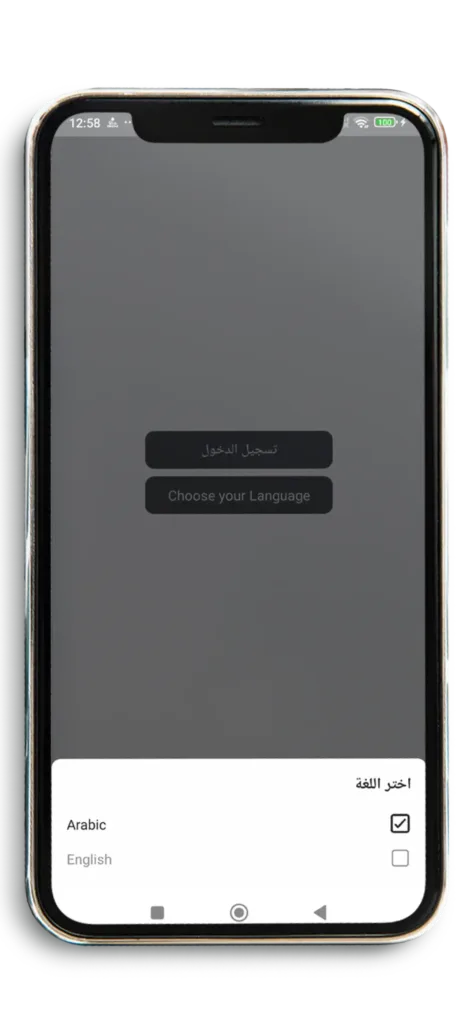
## Output:
## Conclusion:
Adding multilingual support to your React Native app can significantly improve user experience and expand your reach.
Share it with your [**React Native Developer**](https://magecomp.com/hire-react-native-developer.html) friends.
---
_View the original post at: [https://magecomp.com/blog/multilingual-support-react-native-app/](https://magecomp.com/blog/multilingual-support-react-native-app/)_
_Served as markdown by [Third Audience](https://github.com/third-audience) v3.5.3_
_Generated: 2026-08-20 13:30:03 UTC_