---
title: "How to make Sidebar Sticky in Magento 2"
url: "https://magecomp.com/blog/make-sidebar-sticky-in-magento-2/"
date: "2021-03-25T18:44:57+00:00"
modified: "2024-11-29T13:02:04+00:00"
author:
name: "Dhiren Vasoya"
url: "https://magecomp.com/"
categories:
- "Magento Tutorials"
word_count: 765
reading_time: "4 min read"
summary: "Hello Magento Friends,"
description: "Display add to cart button and other product options on the sidebar of the Magento 2 website. Learn How to make Sidebar Sticky in Magento 2."
keywords: "Magento Tutorials"
language: "en"
schema_type: "Article"
related_posts:
- title: "How to Add Custom Fields to Checkout Page in Magento 2?"
url: "https://magecomp.com/blog/add-custom-fields-to-checkout-page-magento-2/"
- title: "How to create Magento Account and Available Options inside (Updated)"
url: "https://magecomp.com/blog/how-to-create-magento-account-and-available-options/"
- title: "How to Import Product Data Programmatically In Magento 2"
url: "https://magecomp.com/blog/import-product-data-programmatically-magento-2/"
---
# How to make Sidebar Sticky in Magento 2
_Published: March 25, 2021_
_Author: Dhiren Vasoya_

**Hello Magento Friends,**
In this Magento tutorial blog, I am going to illustrate How to make Sidebar Sticky in Magento 2.
Sticky Sidebar is the same as Sticky Header that will be displayed all-time on the display window. Check our previous article where I have discussed [**How to Add Sticky Header Component in Magento 2**](https://magecomp.com/blog/add-sticky-header-component-in-magento-2/).
With a sticky sidebar, you can display important elements of the product including add to cart button, or product options. The customer can freely explore your Magento 2 store and add the product to the cart anytime they wish.
Let’s start with How to make Sidebar Sticky in Magento 2.
## Steps to make Sidebar sticky in Magento 2:
**Step 1:** Create **\_extend.less** file as given below path and add code.
**app\\design\\frontend\\Themes\\Yourtheme\\web\\css\\source\\**
```
.media-width(@extremum, @break) when (@extremum = 'min') and (@break = @screen__m)
{
.box-tocart .action.tocart
{
width: 100%;
margin-right: 0;
}
.sidebar
{
&.fixed
{
position: fixed;
}
}
}
```
**Step 2:** Create **catalog\_product\_view.xml** file as give below path and add code.
**app\\design\\frontend\\Themes\\Yourtheme\\Magento\_Catalog\\layout\\**
```
```
**Step 3:** Create **sidebar\_sticky.phtml** file as give below path and add code.
**app\\design\\frontend\\Themes\\Yourtheme\\Magento\_Catalog\\templates\\product\\view\\**
```
```
**Step 4:** Create **requirejs-config.js** file as give below path and add code.
**app\\design\\frontend\\Themes\\Yourtheme\\**
```
var config = {
map: {
"*": {
sidebarstickyshow: "js/sticky-sidebar",
}
}
};
```
**Step 5:** Create a **sticky-sidebar.js** file as give below path and add code.
**app\\design\\frontend\\Themes\\Yourtheme\\web\\js\\**
```
define(["jquery", "matchMedia", "domReady!"], function ($, mediaCheck)
{
"use strict";
var sidebar = {};
var product_form_class = $(".product-add-form");
var mobile_target_detect = $(".product-info-main > .price-box");
var page_main = $(".page-main");
var page_main_view_show;
var main = $(".main");
var main_view;
var header = $(".page-header");
var nav = $(".nav-sections");
var breadcrumbs = $(".breadcrumbs");
var product_addtocart_bottom = parseInt($("#product-addtocart-button").css("margin-bottom"));
var padding_bottom = parseInt(main.css("padding-bottom"));
var margin_bottom = parseInt($(".product.info.detailed").css("margin-bottom"));
sidebar.el = $(".sidebar");
sidebar.padding_ratio = parseFloat(sidebar.el.css("padding-left")) / page_main.width();
sidebar.horizontalview = function ()
{
if (sidebar.el.hasClass("fixed"))
{
page_main_view_show = parseFloat(page_main.width());
main_view = parseFloat(main.width());
sidebar.width = page_main_view_show - main_view;
sidebar.left = ($(window).width() - page_main_view_show) / 2 + main_view;
sidebar.p_left = parseInt(page_main_view_show * sidebar.padding_ratio);
sidebar.el.css({
"width": sidebar.width + "px",
"left": sidebar.left + "px",
"padding-left": sidebar.p_left + "px"
});
}
};
sidebar.desktopview = function ()
{
sidebar.height = sidebar.el.height();
var scrolled_from_top = $(window).scrollTop();
var header_h = header.outerHeight(true) || 0;
var nav_h = nav.outerHeight(true) || 0;
var breadcrumbs_h = breadcrumbs.outerHeight(true) || 0;
var content_h = main.outerHeight(true) || 0;
var sidebar_limit_top = header_h + nav_h + breadcrumbs_h;
var sidebar_limit_bottom = sidebar_limit_top + content_h;
var sidebar_limit_bottom_criteria = scrolled_from_top + sidebar.height + padding_bottom + product_addtocart_bottom - margin_bottom;
if (sidebar_limit_bottom < sidebar_limit_bottom_criteria)
{
sidebar.top = sidebar_limit_bottom - sidebar_limit_bottom_criteria;
sidebar.el.css({"top": sidebar.top + "px"});
}
else if (scrolled_from_top > sidebar_limit_top)
{
if (!sidebar.el.hasClass("fixed"))
{
sidebar.el.addClass("fixed");
sidebar.horizontalview();
}
sidebar.top = 0;
sidebar.el.css({"top": sidebar.top + "px"});
}
else
{
sidebar.el.removeClass("fixed").removeAttr("style");
}
};
var onResize = function ()
{
$(window).on("resize", function ()
{
sidebar.horizontalview();
});
}, onScroll = function ()
{
$(window).on("scroll", function ()
{
sidebar.desktopview();
});
}, onInit = function ()
{
mediaCheck({
media: "(min-width: 768px)",
entry: function ()
{
sidebar.el
.addClass("fixed")
.prepend(product_form_class.detach());
sidebar.horizontalview();
sidebar.desktopview();
onResize();
onScroll();
},
exit: function ()
{
product_form_class.detach().insertAfter(mobile_target_detect);
sidebar.el
.removeClass("fixed")
.removeAttr("style");
}
});
};
});
```
Check final result as shown below:
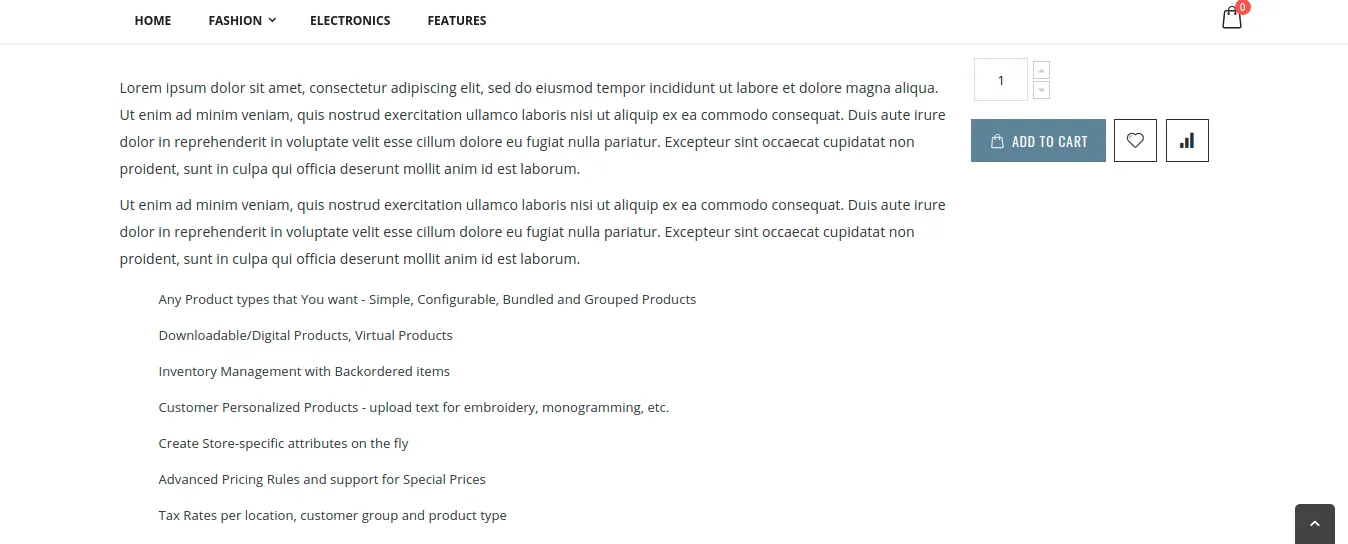
## Conclusion:
Hence, implementing the above steps will help you to make Sidebar Sticky in Magento 2. Also, check out [Magento 2 Sticky Add To Cart](https://magecomp.com/magento-2-sticky-add-to-cart.html) extension for displaying an appealing sticky bar and Add to Cart button. In case you face any difficulty, leave a comment below. I will be right back to you. Also, do not forget to share the solution with your Magento co-workers. Stay tuned for more updates!
**Happy Reading!**
---
_View the original post at: [https://magecomp.com/blog/make-sidebar-sticky-in-magento-2/](https://magecomp.com/blog/make-sidebar-sticky-in-magento-2/)_
_Served as markdown by [Third Audience](https://github.com/third-audience) v3.5.3_
_Generated: 2026-03-12 07:01:09 UTC_