---
title: "How to Make Purchase Order Number Field Optional in Magento 2?"
url: "https://magecomp.com/blog/make-purchase-order-number-field-optional-magento-2/"
date: "2025-05-09T09:30:31+00:00"
modified: "2025-05-09T09:30:32+00:00"
author:
name: "Dhiren Vasoya"
url: "https://magecomp.com/"
categories:
- "How To"
- "Magento 2"
word_count: 641
reading_time: "4 min read"
summary: "Hello Magento Friends,"
description: "Learn how to make the Purchase Order Number field optional in Magento 2 with a simple customization."
keywords: "How To, Magento 2"
language: "en"
schema_type: "Article"
related_posts:
- title: "Magento 1 to Magento 2 Migration – The Complete Guide (2026)"
url: "https://magecomp.com/blog/magento-1-to-magento-2-migration-guide/"
- title: "How to Use Local & Cookie Storage using JavaScript modules in Magento 2"
url: "https://magecomp.com/blog/use-local-cookie-storage-using-javascript-modules-in-magento-2/"
- title: "How to Get Cross Sell Products Collection using Root Script in Magento 2?"
url: "https://magecomp.com/blog/get-cross-sell-products-collection-using-root-script-magento-2/"
---
# How to Make Purchase Order Number Field Optional in Magento 2?
_Published: May 9, 2025_
_Author: Dhiren Vasoya_

**Hello Magento Friends,**
Magento 2 defaults require a Purchase Order (PO) Number when a customer selects Payment Method: Purchase Order during checkout. This works well for B2B businesses that use PO Numbers for their internal procurement tracking.
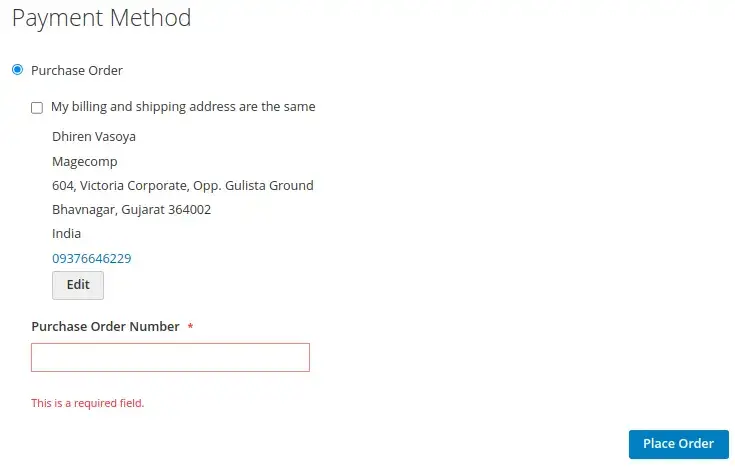However, in many instances, store owners may want to make this field optional to simplify the checkout process.
[](https://magecomp.com/services/magento-upgrade-services/)In this blog, we are going to show you how to make the Purchase Order Number field optional in Magento 2.
## Steps to Make Purchase Order Number Field Optional in Magento 2:
**Step 1:** Create the **requirejs-config.js** file at the file path given below.
**{{magento_root}}\app\code\Vendor\Extension\view\frontend\requirejs-config.js**
Now, add the code as follows
```
var config = {
map: {
'*': {
'Magento_OfflinePayments/template/payment/purchaseorder-form.html':
'Vendor_Extension/template/payment/purchaseorder-form.html'
}
}
};
```
**Step 2:** Create the **purchaseorder-form.html** file at the following path.
**{{magento_root}}\app\code\Vendor\Extension\view\frontend\web\template\payment\purchaseorder-form.html**
Now add the following piece of code
```
```
**Step 3:** Create the **di.xml** file at the below-mentioned path.
**{{magento_root}}\app\code\Vendor\Extension\etc\di.xml**
Then add the following code
```
```
**Step 4:** Create **Purchaseorder.php** file at the following path
**{{magento_root}}\app\code\Vendor\Extension\Plugin\Model\Purchaseorder.php**
After that, include the below-mentioned code
```
getInfoInstance()->getPoNumber())) {
return $this;
}
return $this;
}
}
```
**Output:**
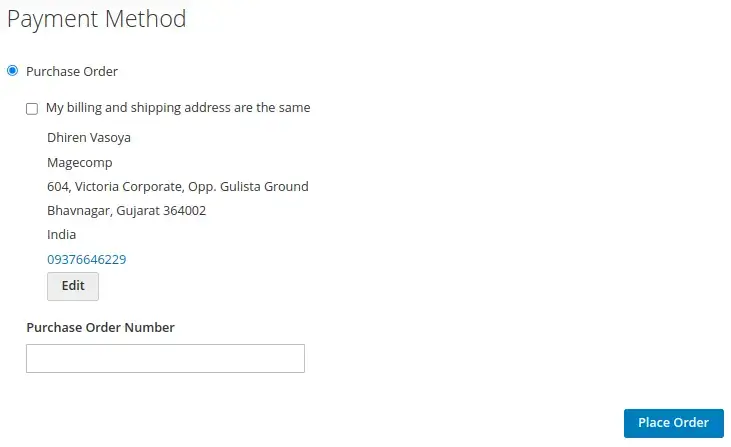
Go to your store, choose Purchase Order during checkout, and you should now be able to place the order without entering a PO number.
## Conclusion:
Customizing Magento 2 to fit your business workflow is a powerful feature. By making the Purchase Order Number field optional, you give your customers more flexibility during checkout, especially useful when you don’t need strict procurement tracking.
However, if you’re running a B2B store where PO numbers are required for audits or invoicing, it’s best to leave this field mandatory.
[](https://magecomp.com/services/hire-magento-programmer/)**Happy Coding!**
---
_View the original post at: [https://magecomp.com/blog/make-purchase-order-number-field-optional-magento-2/](https://magecomp.com/blog/make-purchase-order-number-field-optional-magento-2/)_
_Served as markdown by [Third Audience](https://github.com/third-audience) v3.5.3_
_Generated: 2026-10-01 12:58:29 UTC_