---
title: "Magento 2: How to Set My Account Page Title with Customer Name"
url: "https://magecomp.com/blog/magento-2-set-my-account-page-title-with-customer-name/"
date: "2025-04-28T11:41:28+00:00"
modified: "2025-04-28T11:41:29+00:00"
author:
name: "Dhiren Vasoya"
url: "https://magecomp.com/"
categories:
- "How To"
- "Magento 2"
word_count: 455
reading_time: "3 min read"
summary: "Hello Magento Friends,"
description: "Learn how to personalize the My Account page title in Magento 2 by dynamically displaying the customer's name."
keywords: "How To, Magento 2"
language: "en"
schema_type: "Article"
related_posts:
- title: "How to Hide Price for Guest Users in Magento 2"
url: "https://magecomp.com/blog/hide-price-for-guest-visitors-magento-2/"
- title: "How to Add Additional Column in Invoice PDF for Products Bundle in Magento 2?"
url: "https://magecomp.com/blog/magento-2-add-additional-column-in-invoice-pdf-for-bundle-products/"
- title: "Exclusive List of Best Magento SEO Plugins in 2026"
url: "https://magecomp.com/blog/best-magento-seo-plugins/"
---
# Magento 2: How to Set My Account Page Title with Customer Name
_Published: April 28, 2025_
_Author: Dhiren Vasoya_

**Hello Magento Friends,**
The My account page of the customer interface in Magento 2 is a critical part of the customer experience. The default page title is a bit dull – just “My Account”.
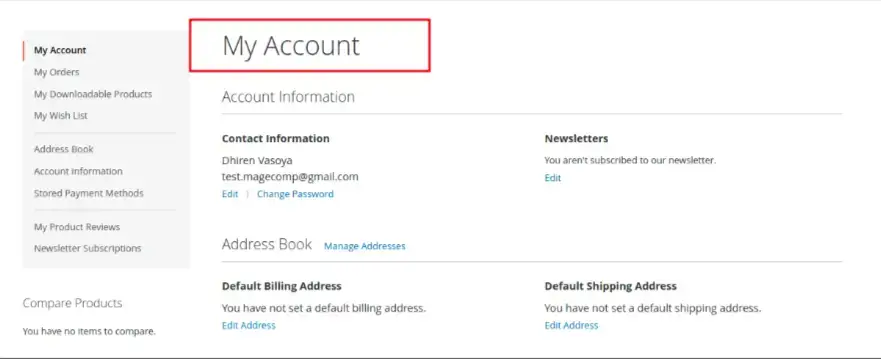Wouldn’t it be much better to do something like dynamically adding the customers name into the page title?
For example, it could read “Dhiren Vasoya’s Account” instead of just “My Account”!
In this blog, I will show you how to change the My Account page title dynamically with the customer’s name in Magento 2.
[](https://magecomp.com/services/hire-magento-programmer/)
## Why Personalize the Account Page Title?
- Enhances customer experience by being personal.
- Adds professionalism to your store.
- Creates trust and engagement with customers.
## Steps to Set My Account Page Title with Customer Name in Magento 2:
**Step 1:** Create a **di.xml** file at the given path
**app/code/Vendor/Extension/etc/frontend/di.xml**
Now add the code as follows:
```
```
**Step 2:** Create a **customer_account_index.xml** file at the given path
**app/code/Vendor/Extension/view/frontend/layout/customer_account_index.xml**
Now add the code as follows:
```
```
**Step 3:** Create an **Index.php** file at the given path
**app/code/Vendor/Extension/Plugin/Customer/Controller/Account/Index.php**
Now add the code as follows:
```
customerSession = $sessionSession;
}
public function afterExecute(
MagentoCustomerControllerAccountIndex $subject,
$resultPage
) {
$resultPage->getConfig()->getTitle()->set(__('Welcome back %1', $this->customerSession->getCustomer()->getName()));
return $resultPage;
}
}
```
**Output:**
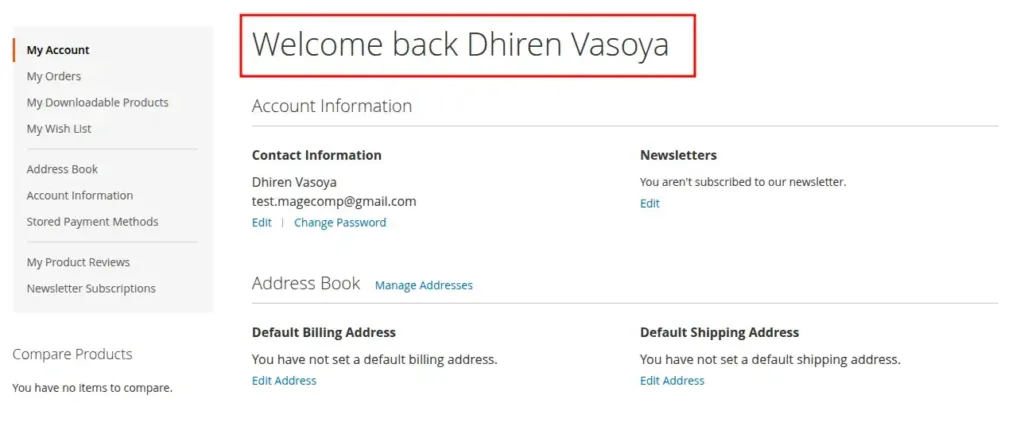
Now, when a logged-in customer goes to check out the My Account page (customer/account/index), they will see the personalized page title:
**Welcome back Dhiren Vasoya**
Instead of the dull “My Account.”
## Conclusion:
Personalizing small things, like the My Account page title, makes a considerable difference in the way users experience your Magento 2 store. This not only adds a level of professionalism to your store but can also help increase customer satisfaction subtly and increase loyalty.
[](https://magecomp.com/services/magento-upgrade-services/)Relevant Read – [**How to Change My Account Navigation Links Title Dynamically in Magento 2?**](https://magecomp.com/blog/change-account-navigation-links-title-dynamically-magento-2/)
---
_View the original post at: [https://magecomp.com/blog/magento-2-set-my-account-page-title-with-customer-name/](https://magecomp.com/blog/magento-2-set-my-account-page-title-with-customer-name/)_
_Served as markdown by [Third Audience](https://github.com/third-audience) v3.5.3_
_Generated: 2026-03-14 04:10:37 UTC_