---
title: "Magento 2: Hide Product Gift Option Tab Based on System Configuration"
url: "https://magecomp.com/blog/magento-2-hide-product-gift-option-tab-based-on-system-configuration/"
date: "2024-12-16T13:22:41+00:00"
modified: "2025-02-12T09:57:34+00:00"
author:
name: "Dhiren Vasoya"
url: "https://magecomp.com/"
categories:
- "How To"
- "Magento 2"
word_count: 791
reading_time: "4 min read"
summary: "Hello Magento friends,"
description: "Learn How to Show or Hide Product Gift Option Tab Based on System Configuration in Magento 2"
keywords: "How To, Magento 2"
language: "en"
schema_type: "Article"
related_posts:
- title: "How to Add Tooltip for Specific Payment Method on Checkout Page?"
url: "https://magecomp.com/blog/add-tooltip-for-specific-payment-method-on-checkout-page/"
- title: "Ultimate Guide to Creating an Attractive Checkout Page in Magento 2 Store"
url: "https://magecomp.com/blog/create-an-attractive-checkout-page-in-magento-2-store/"
- title: "Magento 2: How to Provide Access to your Custom Folder in the Media Gallery"
url: "https://magecomp.com/blog/magento-2-provide-access-to-custom-folder-in-media-gallery/"
---
# Magento 2: Hide Product Gift Option Tab Based on System Configuration
_Published: December 16, 2024_
_Author: Dhiren Vasoya_

**Hello Magento friends,**
In today’s Magento 2 tutorial, I will show How to Hide the Product Gift Option Tab Based on System Configuration.
[](https://magecomp.com/services/magento-upgrade-services/)Magento 2 provides a gift options tab in the backend configuration of products to allow store owners to let customers [**add gift messages**](https://magecomp.com/blog/enable-gift-message-in-magento-2/) to their purchases. While some products may not require gift options, at that time you do not require a gift options tab in the backend configuration. Follow the below steps to Hide Product Gift Option Tab Based on System Configuration in Magento 2.
## Steps to Hide Product Gift Option Tab Based on System Configuration in Magento 2:
**Step 1:** Create a **di.xml** file in the given below path
**{{magento\_root}}\\app\\code\\Vendor\\Extension\\etc\\adminhtml\\di.xml
Then add the code as follows
```
Vendor\Extension\Ui\DataProvider\ProductForm20
```
**Step 2:** Create a **system.xml** in the following path
**{{magento\_root}}\\app\\code\\Vendor\\Extension\\etc\\adminhtml\\system.xml**
Now add the given below code
```
vendorVendor_Extension::configMagento\Config\Model\Config\Source\Yesno
```
[](https://magecomp.com/magento-malware-removal.html)**Step 3:** Create an **acl.xml** in below-mentioned path
**{{magento\_root}}\\app\\code\\Vendor\\Extension\\etc\\acl.xml**
Now add the following piece of code
```
```
**Step 4:** Create a **ProductForm.php** in the given below path.
**{{magento\_root}}\\app\\code\\Vendor\\Extension\\Ui\\DataProvider\\ProductForm.php**
Then add the code as below
```
locator = $locator;
$this->request = $request;
$this->layoutFactory = $layoutFactory;
$this->scopeConfig = $scopeConfig;
}
public function modifyMeta(array $meta)
{
// Check if the configuration flag is enabled
$isEnable = $this->scopeConfig->isSetFlag(
'general_settings/general/enabled',
\Magento\Store\Model\ScopeInterface::SCOPE_STORE
);
if ($isEnable && isset($meta['gift-options'])) {
$meta['gift-options']['arguments']['data']['config']['visible'] = false;
$meta['gift-options']['arguments']['data']['config']['canShow'] = false;
}
return $meta;
}
/**
* {@inheritdoc}
*/
public function modifyData(array $data)
{
return $data;
}
/**
* Get product type
*
* @return null|string
*/
private function getProductType()
{
return (string)$this->request->getParam('type', $this->locator->getProduct()->getTypeId());
}
}
```
**Output:**
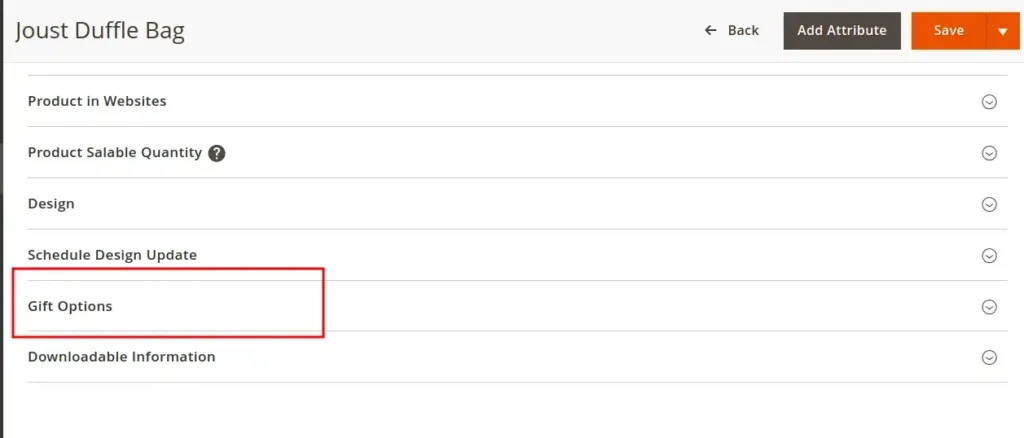
If the Hide Product Gift Option is set to No,
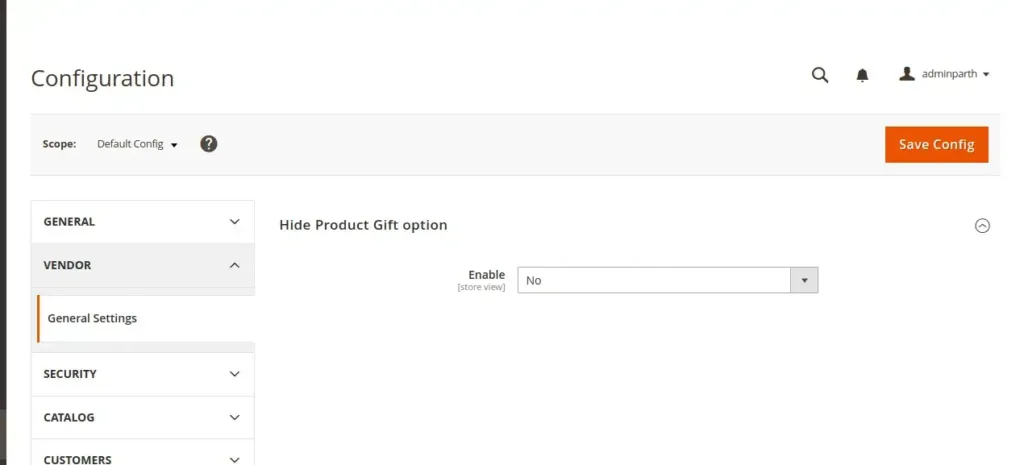it will display the Gift Options tab for the product
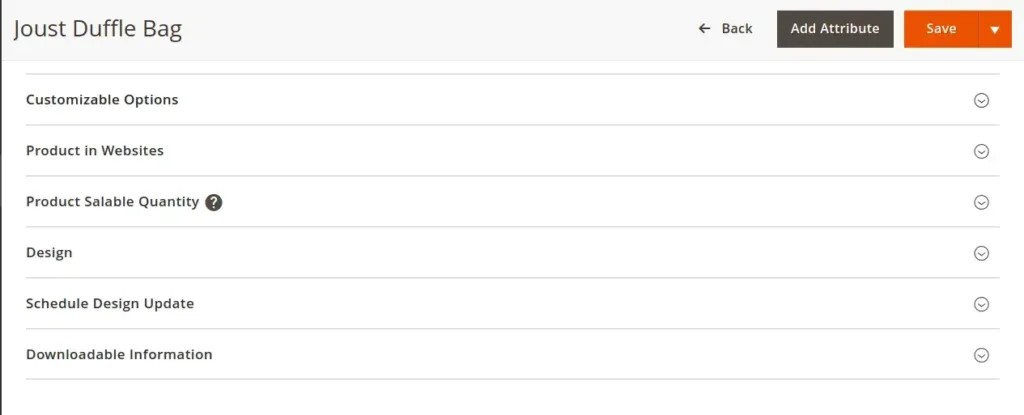
If the Hide Product Gift Option is set to Yes,
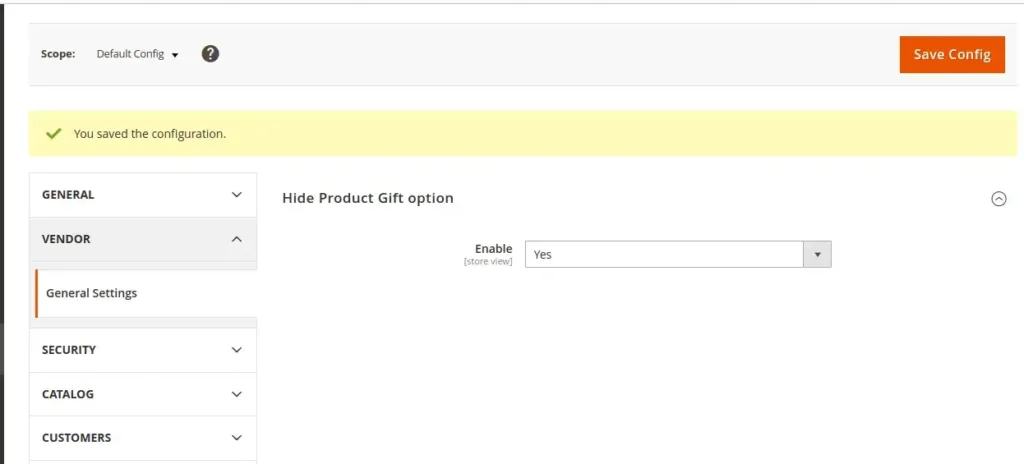it will not display the Gift Options tab for the product
[](https://magecomp.com/magento-performance-optimization.html)
## Conclusion:
Hence, this way you can hide and unhide the product gift option tab based on system configuration in Magento 2. Share your doubts through the comment box and stay with us for more such tutorials.
**Happy Coding!**
---
_View the original post at: [https://magecomp.com/blog/magento-2-hide-product-gift-option-tab-based-on-system-configuration/](https://magecomp.com/blog/magento-2-hide-product-gift-option-tab-based-on-system-configuration/)_
_Served as markdown by [Third Audience](https://github.com/third-audience) v3.5.3_
_Generated: 2026-03-13 13:56:37 UTC_