---
title: "Magento 2: How to Add Custom Checkbox to Checkout?"
url: "https://magecomp.com/blog/magento-2-custom-checkbox-to-checkout/"
date: "2021-07-07T15:58:21+00:00"
modified: "2024-11-25T14:00:55+00:00"
author:
name: "Dhiren Vasoya"
url: "https://magecomp.com/"
categories:
- "Magento Tutorials"
word_count: 639
reading_time: "4 min read"
summary: "Hello, Magento Buddies!"
description: "Discover more on How to Add Custom Checkbox to Checkout in your Magento 2 store programmatically with proper code."
keywords: "Magento Tutorials"
language: "en"
schema_type: "Article"
related_posts:
- title: "Method to Integrate SBI Payment Gateway for Magento 2"
url: "https://magecomp.com/blog/integrate-sbi-payment-gateway-for-magento-2/"
- title: "How to Setup Twilio WhatsApp Business API"
url: "https://magecomp.com/blog/setup-twilio-whatsapp-business-api/"
- title: "How to Setup Reports Configuration in Magento 2"
url: "https://magecomp.com/blog/setup-reports-configuration-in-magento-2/"
---
# Magento 2: How to Add Custom Checkbox to Checkout?
_Published: July 7, 2021_
_Author: Dhiren Vasoya_
**Hello, Magento Buddies!**
Keen to know How to Add Custom Checkbox to Checkout in Magento 2 store? I’ve got you covered.
To drive your online business to the path of success, an appealing checkout page can be a significant factor to consider. There are methods through which you can make your checkout page faultless and one of them can be to add a custom checkbox to the checkout page.
It is pivotal to make the online sales journey of customers as simple as possible and the checkout page is the most decisive one throughout the online sales journey. The store owners lookout to make the checkout page as complete and thorough as possible by the addition or removal of certain fields.
The admins could possibly want to add the Custom Checkbox in their [Magento 2 Checkout page](https://magecomp.com/magento-2-checkout-success-page.html). Taking an instance, the admins may look to add a custom checkbox to the terms and conditions and the newsletter checkbox.
In this tutorial, I will walk you through the 2 fundamental ways you can Add a Custom checkbox to the Checkout Page in your Magento 2 store.
## Steps to Add Custom Checkbox to Checkout Magento 2
**Add Custom Checkbox to Checkout Programmatically**
**Step 1:** Firstly, create the **checkout\_index\_index.xml** file in the below-given path.
**app\\code\\Vendor\\Extension\\view\\frontend\\layout\\**
Now, add the below-given code:
```
Vendor_Extension/js/view/checkout-form-js
```
**Step 2:** Next, create the **checkout-form-js.js** in the below-given path.
**app\\code\\Vendor\\Extension\\view\\frontend\\web\\js\\view\\**
Now, add the below-mentioned code:
```
define([
'ko',
'uiComponent'
], function (ko, Component) {
"use strict";
return Component.extend({
defaults: {
template: 'Vendor_Extension/checkout-form'
},
isRegisterNewsletter: true
});
}
);
```
**Step 3:** Next, create the **checkout-form.html** in the below-given path.
**app\\code\\Vendor\\Extension\\view\\frontend\\web\\template\\**
Now, add the below-mentioned code:
```
```
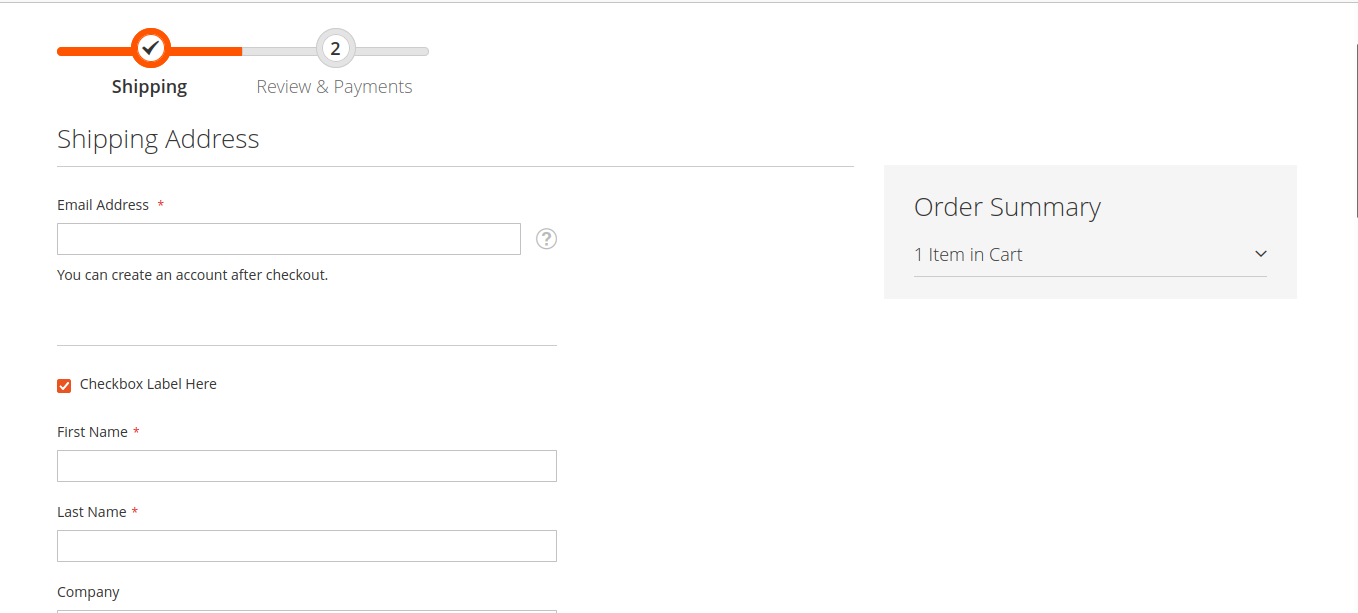
The output of the above code will look as given below:
[](https://magecomp.com/blog/wp-content/uploads/2021/07/output-to-add-custom-checkbox-to-checkout.png)
## Summing It Up:
Hence these were the main steps you can add a custom checkbox at the checkout page in Magento 2 by technically appending the code mentioned above. Also, install [Custom Checkout Fields](https://magecomp.com/magento-2-custom-checkout-fields.html) which helps the store admin customize the checkout page by adding extra fields.
I hope this helps you! Any queries are appreciated through the comments section below.
Grab our [**Magento Custom Extension Development Service**](https://magecomp.com/magento-custom-extension-development.html) and custom-develop extensions according to your requirement to make your store bountiful of resources. Or you can also check **[Magento Development Services](https://magecomp.com/magento-development-services)**.
**Happy Coding!**
---
_View the original post at: [https://magecomp.com/blog/magento-2-custom-checkbox-to-checkout/](https://magecomp.com/blog/magento-2-custom-checkbox-to-checkout/)_
_Served as markdown by [Third Audience](https://github.com/third-audience) v3.5.3_
_Generated: 2026-03-07 04:58:57 UTC_