---
title: "Magento 2: How to Add Quantity Increment & Decrement Functionality at Checkout Summary"
url: "https://magecomp.com/blog/magento-2-add-quantity-increment-decrement-functionality-at-checkout-summary/"
date: "2021-03-26T15:09:10+00:00"
modified: "2025-02-20T07:20:27+00:00"
author:
name: "Dhiren Vasoya"
url: "https://magecomp.com/"
categories:
- "How To"
- "Magento 2"
word_count: 1342
reading_time: "7 min read"
summary: "Hello Magento Friends,"
description: "Allow customers to change the product quantity directly from the checkout page. Learn - Magento 2: How to Add Quantity Increment & Decrement Functionality at..."
keywords: "How To, Magento 2"
language: "en"
schema_type: "Article"
related_posts:
- title: "Best Magento 2 Payment Gateways (Latest 2026)"
url: "https://magecomp.com/blog/best-magento-2-payment-gateways/"
- title: "How to pre-open “Apply Voucher Code” in the Checkout page of Magento 2"
url: "https://magecomp.com/blog/pre-open-apply-voucher-code-checkout-page-magento-2/"
- title: "Magento 2: How to Get Custom Column Value of Order using GraphQL"
url: "https://magecomp.com/blog/magento-2-get-custom-column-value-of-order-using-graphql/"
---
# Magento 2: How to Add Quantity Increment & Decrement Functionality at Checkout Summary
_Published: March 26, 2021_
_Author: Dhiren Vasoya_

**Hello Magento Friends,**
Hope all are healthy and safe. Today I am here with a significant solution that will make your Magento store feature-rich. Magento 2: How to Add [Quantity Increment & Decrement Functionality](https://magecomp.com/magento-2-quantity-increment-decrement.html) at Checkout Summary.
[](https://magecomp.com/services/hire-magento-programmer/)
E-commerce store owners are always finding ways for offering convenience and comfort to customer’s shopping journey. If the customers need to navigate more pages to perform any action, it results in a bad user experience of the store. One such case is increasing and decreasing product quantity.
Customers can only increase or decrease the product quantity on the cart or mini cart. But sometimes we need to add this functionality to the checkout summary page. The customers can easily perform increment and decrement of product quantity or even remove the product from the [checkout page](https://magecomp.com/magento-2-checkout-success-page.html) without moving to the cart page or mini cart.
Let’s find out the steps to Add Quantity Increment & Decrement Functionality at Checkout Summary in Magento 2.
## Steps to Add Quantity Increment & Decrement Functionality at Checkout Summary in Magento 2:
**Step 1:** First you need to add /modify the **details.html** file in the following path
**app\design\frontend\Themes\Yourtheme\Magento_Checkout\web\template\summary\item\details.html**
```
```
**Step 2:** Now add/modify the **details.js** file in the following path
**app\design\frontend\Themes\Yourtheme\Magento_Checkout\web\js\view\summary\item\details.js**
```
define([
'jquery',
'uiComponent',
'Magento_Customer/js/model/authentication-popup',
'Magento_Customer/js/customer-data',
'Magento_Checkout/js/model/quote',
'Magento_Checkout/js/action/get-totals',
'Magento_Checkout/js/model/shipping-service',
'Magento_Checkout/js/model/shipping-rate-registry',
'Magento_Checkout/js/model/resource-url-manager',
'mage/storage',
'Magento_Checkout/js/model/error-processor',
'mage/url',
'Magento_Ui/js/modal/alert',
'Magento_Ui/js/modal/confirm',
'underscore',
'jquery/ui',
'mage/decorate',
'mage/collapsible',
'mage/cookies'
], function ($, Component, authenticationPopup, customerData, quote, getTotalsAction, shippingService, rateRegistry, resourceUrlManager, storage, errorProcessor, url,alert, confirm, _) {
'use strict';
return Component.extend({
shoppingCartUrl: window.checkout.shoppingCartUrl,
defaults: {
template: 'Magento_Checkout/summary/item/details'
},
/**
* @param {Object} quoteItem
* @return {String}
*/
getValue: function (quoteItem)
{
return quoteItem.name;
},
updateItemQtyCheckout: function (data, event)
{
var btnminus = "";
var btnplus = "";
if (event.target.classList[1] == "minus")
{
btnminus = event.currentTarget.dataset.btnMinus;
}
if (event.target.classList[1] == "plus")
{
btnplus = event.currentTarget.dataset.btnPlus;
}
var itemId = event.currentTarget.dataset.cartItem;
// If element is minus and quantity is '1' than remove
var elem = $('#cart-item-' + itemId + '-qty');
if(event.target.classList[1] == 'plus')
{
elem.val(parseInt(elem.val()) + 1)
}
else if(event.target.classList[1] == 'minus')
{
elem.val(parseInt(elem.val()) - 1)
}
if (event.target.classList[1] == "minus" && $('#cart-item-' + itemId + '-qty').val() == '0')
{
var productData = this._getProductById(Number(itemId));
if (!_.isUndefined(productData))
{
var self = this;
var elemr = elem;
self._ajax(url.build('checkout/sidebar/removeItem'), {
'item_id': itemId
}, elemr, self._removeItemAfter);
if (window.location.href === self.shoppingCartUrl)
{
window.location.reload(false);
}
}
}
else
{
this._ajax(url.build('checkout/sidebar/updateItemQty'), {
'item_id': itemId,
'item_qty': $('#cart-item-' + itemId + '-qty').val(),
'item_btn_plus': btnplus,
'item_btn_minus': btnminus
}, elem, this._updateItemQtyAfter);
}
},
_getProductById: function (productId)
{
return _.find(customerData.get('cart')().items, function (item)
{
return productId === Number(item['item_id']);
});
},
_updateItemQtyAfter: function (elem)
{
var productData = this._getProductById(Number(elem.data('cart-item')));
if (!_.isUndefined(productData))
{
$(document).trigger('ajax:updateCartItemQty');
if (window.location.href === this.shoppingCartUrl)
{
window.location.reload(false);
}
}
this._hideItemButton(elem);
this._customerData();
},
_customerData: function ()
{
var deferred = $.Deferred();
getTotalsAction([], deferred);
var sections = ['cart'];
customerData.invalidate(sections);
customerData.reload(sections, true);
var self = this;
self._estimateTotalsAndUpdateRatesCheckout();
},
_ajax: function (url, data, elem, callback)
{
$.extend(data, {
'form_key': $.mage.cookies.get('form_key')
});
$.ajax({
url: url,
data: data,
type: 'post',
dataType: 'json',
context: this,
/** @inheritdoc */
beforeSend: function ()
{
elem.attr('disabled', 'disabled');
},
/** @inheritdoc */
complete: function ()
{
elem.attr('disabled', null);
}
})
.done(function (response)
{
var msg;
if (response.success)
{
callback.call(this, elem, response);
}
else
{
msg = response['error_message'];
if (msg)
{
alert({
content: msg
});
}
}
})
.fail(function (error)
{
console.log(JSON.stringify(error));
});
},
_hideItemButton: function (elem)
{
var itemId = elem.data('cart-item');
$('#update-cart-item-' + itemId).hide('fade', 300);
},
_removeItemAfter: function (elem)
{
var productData = this._getProductById(Number(elem.data('cart-item')));
if (!_.isUndefined(productData))
{
$(document).trigger('ajax:removeFromCart', {
productIds: [productData['product_id']]
});
var sections = ['cart'];
setTimeout(function ()
{
if (customerData.get('cart')().items.length == 0)
{
window.location.reload();
}
}, 2000);
if (window.location.href.indexOf(this.shoppingCartUrl) === 0)
{
window.location.reload();
}
}
this._customerData();
},
_estimateTotalsAndUpdateRatesCheckout: function ()
{
var serviceUrl, payload;
var address = quote.shippingAddress();
shippingService.isLoading(true);
serviceUrl = resourceUrlManager.getUrlForEstimationShippingMethodsForNewAddress(quote);
payload = JSON.stringify({
address: {
'street': address.street,
'city': address.city,
'region_id': address.regionId,
'region': address.region,
'country_id': address.countryId,
'postcode': address.postcode,
'email': address.email,
'customer_id': address.customerId,
'firstname': address.firstname,
'lastname': address.lastname,
'middlename': address.middlename,
'prefix': address.prefix,
'suffix': address.suffix,
'vat_id': address.vatId,
'company': address.company,
'telephone': address.telephone,
'fax': address.fax,
'custom_attributes': address.customAttributes,
'save_in_address_book': address.saveInAddressBook
}
}
);
storage.post(
serviceUrl, payload, false
).done(function (result) {
rateRegistry.set(address.getCacheKey(), result);
shippingService.setShippingRates(result);
}).fail(function (response) {
shippingService.setShippingRates([]);
errorProcessor.process(response);
}).always(function () {
shippingService.isLoading(false);
});
}
});
});
```
[](https://magecomp.com/services/magento-upgrade-services/)
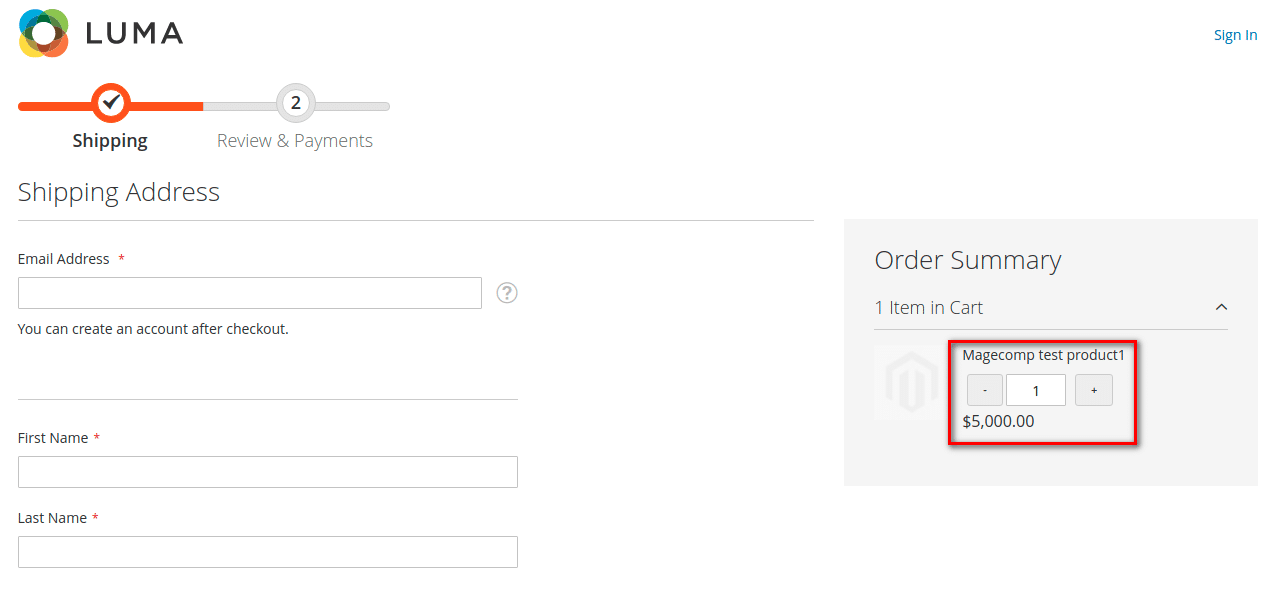
After implementing the above code the quantity increment & decrement functionality will be added to the checkout summary of your Magento 2 store.
## Conclusion:
Hopefully, everyone is able to Add Quantity Increment & Decrement Functionality at Checkout Summary in Magento 2. Besides this, you can also [**Add Discount Component to Checkout Order Summary in Magento 2**](https://magecomp.com/blog/add-discount-component-to-checkout-order-summary-magento-2/).
If you have trouble executing the code, feel free to reach me via comment. I will be glad to help you out. Do share the article on your social media and stay updated for more tutorials.
[](https://magecomp.com/magento-malware-removal.html)
**Happy Coding!**
---
_View the original post at: [https://magecomp.com/blog/magento-2-add-quantity-increment-decrement-functionality-at-checkout-summary/](https://magecomp.com/blog/magento-2-add-quantity-increment-decrement-functionality-at-checkout-summary/)_
_Served as markdown by [Third Audience](https://github.com/third-audience) v3.5.3_
_Generated: 2026-10-05 20:21:38 UTC_