---
title: "Magento 2: How to Add Frontend Product URL Column to Admin Product Grid"
url: "https://magecomp.com/blog/magento-2-add-frontend-product-url-column-admin-product-grid/"
date: "2020-04-13T19:21:08+00:00"
modified: "2025-02-21T08:50:08+00:00"
author:
name: "Dhiren Vasoya"
url: "https://magecomp.com/"
categories:
- "How To"
- "Magento 2"
word_count: 603
reading_time: "4 min read"
summary: "Hello Magento Kins,"
description: "The complete guide for How to Add Frontend Product URL Column to Admin Product Grid in Magento 2 helps user admin to view the product in frontend in one cl..."
keywords: "How To, Magento 2"
language: "en"
schema_type: "Article"
related_posts:
- title: "How to Pre-select Default Payment Method at the Checkout Page in Magento 2?"
url: "https://magecomp.com/blog/pre-select-default-payment-method-at-the-checkout-page-magento-2/"
- title: "How to Set Up Cron Jobs in Magento 2"
url: "https://magecomp.com/blog/set-up-cron-jobs-in-magento-2/"
- title: "How to get a count of product with no images using SQL Query in Magento 2"
url: "https://magecomp.com/blog/get-count-product-no-images-using-sql-query-magento-2/"
---
# Magento 2: How to Add Frontend Product URL Column to Admin Product Grid
_Published: April 13, 2020_
_Author: Dhiren Vasoya_
Hello Magento Kins,
How are things going? I will guide How to Add Frontend Product URL Column to Admin Product Grid in this article of **[Magento 2 How To series](https://magecomp.com/blog/category/how-to-magento/)**. You shall get some good ideas from the previous tutorial about **[Magento 2: Show Related Products On The List Page](https://magecomp.com/blog/magento-2-show-related-products-list-page/).**
[](https://magecomp.com/services/hire-magento-programmer/)
Basically, there is a requirement to view the product on the front-end or if you want to see a product in your front end then you have to search that product by name or with the help of SKU from the front end. And one has to find the SKU and product name manually by visiting the product grid and then copy that SKU or the product name and after this search that product from the Front-End.
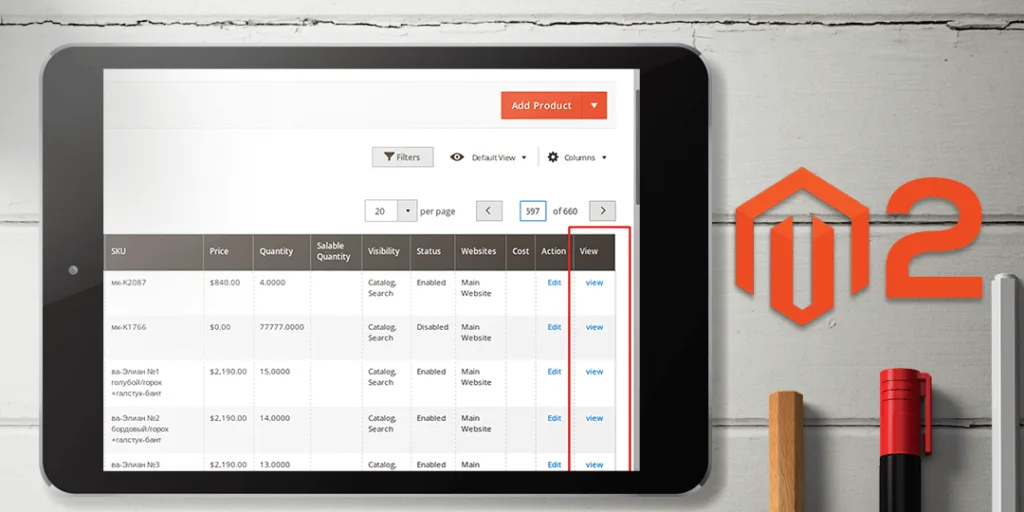
Therefore, to overcome this problem here is the solution in which there is some code of implementation and with the help of that user can effortlessly redirect that product from the product grid from the admin. Here, just after writing some mandatory code we successfully add one column on the product grid which contains a link which is simply redirected to view the product on the frontend.
## Steps to Code
**Step 1:** First you need to create product_listing.xml in following path:
**app\code\Vendor\Extension\view\adminhtml\ui_component\product_listing.xml**
```
-
- ui/grid/cells/html
- text
- View
```
**Step 2:** Now you need to add Productgrid.php file in the following path:
**app\code\Vendor\Extension\Ui\Component\Columns\Productgrid.php**
```
ProductRepositoryInterface = $ProductRepositoryInterface;
}
public function prepareDataSource(array $dataSource)
{
if (isset($dataSource["data"]["items"])) {
$fieldName = $this->getData("name");
foreach ($dataSource["data"]["items"] as $key => $item) {
$product = $this->ProductRepositoryInterface->getById($item['entity_id'], false);
$url = $product->getUrlModel()->getUrlInStore($product, ['_escape' => true]);
$html = "";
$html .= "view";
$html .= "";
$dataSource["data"]["items"][$key][$fieldName] = $html;
}
}
return $dataSource;
}
}
```
[](https://magecomp.com/services/magento-upgrade-services/)
And after implementing the following steps you will be displayed the added column on the admin grid of the product.
## Wrapping Up
Apply the simple steps illustrated above and make yourself more capable of viewing directly the desired products in the frontend and no need to work hard and waste time in searching the SKU and the product name to view the products in the frontend. And if face any problem in implementing the above steps then contact our [**Support Team**](https://magecomp.com/support/) the will guide you accordingly.
Do comment down your opinions regarding this tutorial and if it seems to be helpful then share it with your Magento pals and help them improve their knowledge.
[](https://magecomp.com/magento-malware-removal.html)
Happy Coding?
---
_View the original post at: [https://magecomp.com/blog/magento-2-add-frontend-product-url-column-admin-product-grid/](https://magecomp.com/blog/magento-2-add-frontend-product-url-column-admin-product-grid/)_
_Served as markdown by [Third Audience](https://github.com/third-audience) v3.5.3_
_Generated: 2026-10-14 07:55:35 UTC_