---
title: "How to Add Magento 2 Sort by Price for Low to High & High to Low Options?"
url: "https://magecomp.com/blog/add-magento-2-sort-by-price-for-low-to-high-high-to-low-options/"
date: "2020-11-20T10:00:04+00:00"
modified: "2025-01-30T10:12:26+00:00"
author:
name: "Dhiren Vasoya"
url: "https://magecomp.com/"
categories:
- "Magento Tutorials"
word_count: 563
reading_time: "3 min read"
summary: "Hello Magento Folks,"
description: "Sorting options helps the customers to search for products easily. Learn more How to Add Magento 2 Sort by Price for Low to High & High to Low Options"
keywords: "Magento Tutorials"
language: "en"
schema_type: "Article"
related_posts:
- title: "How to Configure/Setup Value Added Tax (VAT) in Magento 2?"
url: "https://magecomp.com/blog/configure-value-added-tax-vat-in-magento-2/"
- title: "How to Add Custom Message to Login Page in Magento 2?"
url: "https://magecomp.com/blog/add-custom-message-to-login-page-in-magento-2/"
- title: "How to Configure Order Item Status to Enable Downloads in Magento 2?"
url: "https://magecomp.com/blog/configure-order-item-status-to-enable-downloads-magento-2/"
---
# How to Add Magento 2 Sort by Price for Low to High & High to Low Options?
_Published: November 20, 2020_
_Author: Dhiren Vasoya_

Hello Magento Folks,
How are you all? Have you all took the advantage of the MageComp Diwali offers? It’s the last day for [**MageComp Big Diwali Sale 2020**](https://magecomp.com/blog/magecomp-big-diwali-sale-2020/). Shop now and get huge discounts on Magento Extensions and Services. In this article, I will guide you How to Add Magento 2 Sort by Price for Low to High & High to Low Options. Let’s get started.
[](https://magecomp.com/magento-2-mobile-app-builder)
## Quick Intro:
Ecommerce stores must have precise and user-friendly navigation that makes the customers way easy to shop from your store. Sorting is a major component to provide for user’s ease and effortless searching for the product they are finding. By default, Magento 2 is capable of providing the below-given options such as by position, product name, and price.
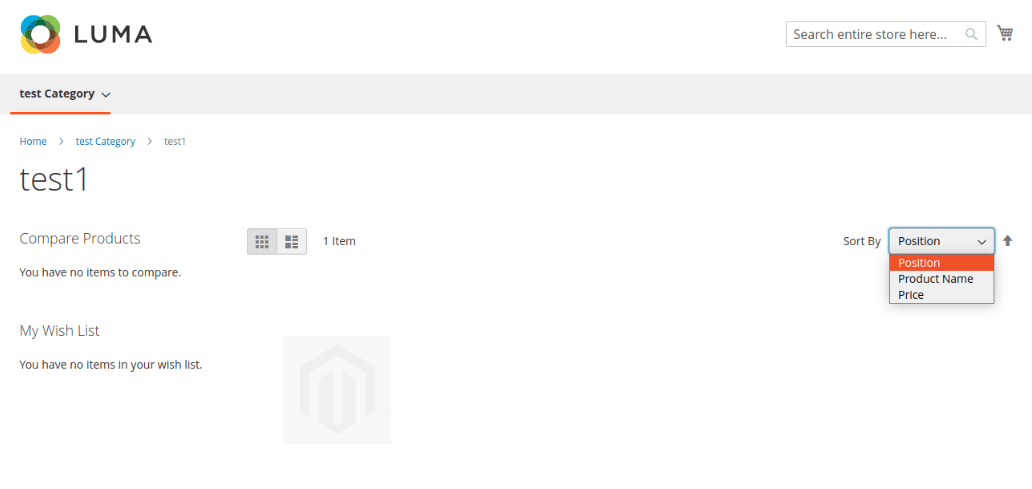
Many times the customers are looking for the cheapest products and some of the customers need the high-priced products then for them the above sorting options are not efficient. For offering the options of sort by price for low to high & high to low in Magento 2 follow the below-given steps.
## Steps to Add Magento 2 Sort by Price for Low to High & High to Low Options:
**Step 1:** create registration.php file in app\\code\\Vendor\\Extension
```
```
**Step 3:** Create di.xml file in app\\code\\Vendor\\Extension\\etc
```
```
**Step 4:** Create Toolbar.php file in app\\code\\Vendor\\Extension\\\\Plugin\\Catalog\\Block
```
getCurrentOrder();
$result = $proceed($collection);
if($currentOrder)
{
if($currentOrder == 'high_to_low')
{
$subject->getCollection()->setOrder('price', 'desc');
}
elseif ($currentOrder == 'low_to_high')
{
$subject->getCollection()->setOrder('price', 'asc');
}
}
else
{
$subject->getCollection()->getSelect()->reset('order');
$subject->getCollection()->setOrder('price', 'asc');
}
return $result;
}
}
```
**Step 5:** Create Config.php file in app\\code\\Vendor\\Extension\\Plugin\\Catalog\\Model
```